If you have started searching that, something about Facebook Groups has stopped fitting -
the price, the lock-in, the rented-land feeling. Here is the honest version: the
real reasons people look elsewhere, whether BuddyNext is a genuine answer, the
other options worth a look, and how to actually move.
Why people look for a Facebook Groups alternative.
Facebook Groups are free and where people already are, which is a real advantage. People leave when they get tired of building on rented land - no ownership, no data, an algorithm deciding who sees what, and ads in the middle of their community. If you want to move your group to your own site, the short answer is that there is no export, so it is a rebuild and an invitation.
→You own nothing. The group, the members and every post belong to Facebook, and Meta can change reach, rules or the whole feature whenever it likes.
→The algorithm gates your own audience - members miss your posts unless Facebook decides to show them.
→No member data and no email list. You cannot export your people or reach them directly off-platform.
→Ads and distractions sit inside your community, and the experience is unmistakably Facebook's, not your brand.
→One long feed, little paid access and no SEO - it is a group inside a social network, not a community of rooms you control.
None of this means Facebook Groups is a bad product - for plenty of communities it is the right call.
These are simply the friction points that send people looking, stated fairly.
The case for BuddyNext
Why BuddyNext is a strong Facebook Groups alternative.
BuddyNext is a self-hosted community platform for WordPress. The whole idea is the
opposite of renting: you own the data, you pay for hosting instead of a platform cut,
and you start free. Here is where that pays off against Facebook Groups.
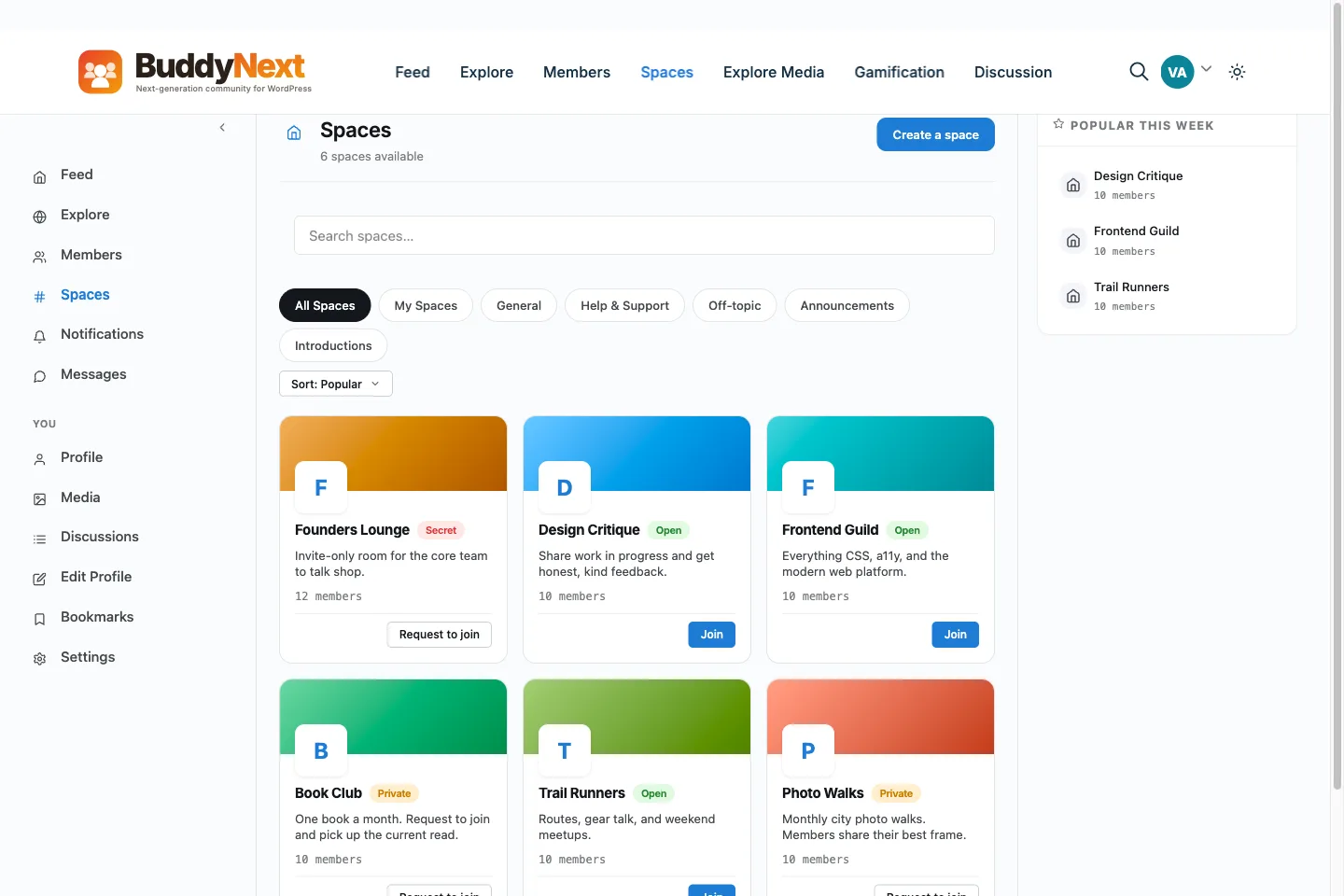
✓A Facebook group is one feed inside someone else's app; BuddyNext is a whole platform built in-house by one team - community, forums, courses, events, a job board, a marketplace, and gamification together - and you own all of it on your own site instead of renting a wall inside Meta's app.
✓The audience becomes yours, not Meta's. On Facebook the members and their contact details belong to the platform; with BuddyNext they live in your own database, so you can export the list, email them, and reach them directly instead of renting access to people the algorithm decides whether to show your posts to.
✓No algorithm between you and your members. A BuddyNext feed shows your community what was actually posted, in order, rather than throttling reach so that only a fraction of members ever see a post.
✓No ads and no competing platform. Your community is your own space, not a surface wrapped in Facebook's ads and pulled toward the rest of the app and its notifications.
✓A real platform, not a single group wall: spaces, member profiles, direct messages (with the free WPMediaVerse plugin), and a moderation queue give your community structure a Facebook group simply cannot.
✓Your terms, not Meta's. Groups can be restricted, demoted, or shut down under rules you don't set; a self-hosted community can't be taken away by a platform decision.
✓Monetization you keep. With BuddyNext Pro you can gate and charge for access on your own terms - your community is an asset you build equity in, not free content inside someone else's ad business.
We would rather you pick the right home than just pick ours. If BuddyNext is not your
fit, these are real options worth a look - each suits a different kind of community.
CircleA clean hosted home off Facebook, if you want zero maintenance and are happy to pay monthly.
DiscordFree and lively if your community is really about real-time chat.
BuddyNextYour own community on your own domain - spaces with sub-spaces, an installable web app, and paid rooms in Pro, with a free tier to start.
No fairy tales
How to switch - honestly.
You can move a Facebook group to your own site, but there is no importer: Facebook gives you almost nothing to export. So the move is about rebuilding the home and bringing people over. Collect emails while the group is still active, stand up your new community, then bring members in with a bulk CSV invite or an invite link. Post the move clearly in the group, give members a simple reason to join, and run both in parallel for a while before you wind the Facebook group down. Native apps are in development, so for now members add your site to their home screen as a web app.
1Plan it as a real project. A community move is migration work, not a button. Give it a window and a checklist, not an afternoon and a hope.
2Export your data first. Pull out your members, content and anything you can from Facebook Groups before you touch the new platform, so nothing depends on access you might lose.
3Build and test on staging. Stand up BuddyNext on a staging copy of your site, import everything, and check messaging, spaces and access actually work before any member sees it.
4Cut over and bring people across. Point your domain at the new home, invite your most active members first, and run both in parallel for a short while rather than flipping everyone at once.
Anyone selling you a magic one-click migration off a hosted platform is overselling it.
Done as a real project, though, the move is very doable - and you only do it once.
Moving off Facebook Groups
A plan for moving a Facebook group to a community you own.
Facebook gives you almost nothing to export, so this is a rebuild and an invitation, not a migration. This guide covers how to get contact details, how to turn one long feed into rooms, how to charge for some of them, and what to say about the app.
Get a way to reach people first
Facebook does not hand you a member list with emails, so the first job is to collect them while the group is still active.
Pin a post that explains the move and links to a sign-up form on your site.
Ask for an email address in the membership questions on new requests.
Copy out the posts you cannot lose: rules, pinned posts and the best answers.
Write down your admins and moderators, and who you want in the new team.
An email you hold yourself is the only contact that stays yours.
Turn one feed into rooms
A big Facebook group is one long feed. BuddyNext gives you spaces, each with its own feed, members, rules and moderators.
Make a space for each topic people keep posting about. Choose public, private or secret for each.
Use sub-spaces for finer detail. They go two levels deep in the free core, so a region can hold its own towns, for example.
Use request-to-join or invite links for spaces that should stay small. Invite links can expire and have a use cap.
Use the moderation queue for reported posts, and hand out moderator roles space by space.
Charging for some rooms
Facebook Groups has little in the way of paid access. In BuddyNext Pro you can create membership plans and gate a space behind one or more of them, so a free lounge and a paid inner room sit on one site.
Create a plan for each tier and set its monthly and annual price.
Attach each plan to the spaces it opens. One space can be opened by several plans.
Connect your own Stripe or PayPal account. BuddyNext takes no cut of the sale.
Leave most spaces open. A paid room works best when the free ones are worth joining first.
Can I have my own app?
The free core is an installable web app. Members can add your community to their home screen from the browser, and it needs HTTPS. Native apps for the app stores are in development, with no date, so do not promise members an app-store listing yet.
Push notifications are in Pro, and email and in-app notifications are in the free core.
The move, step by step
1Collect emails and copy out what you cannot lose.
2Build the spaces on a staging site and set each one's visibility.
3Test as a stranger on a phone: sign up from an invite, post and react.
4Invite your most active members first and fix what they find.
5Post the move in the group with a date and a simple reason to join.
6Run both for a few weeks and answer questions only in the new place.
7Wind the Facebook group down to read-only once the regulars have moved.
What it costs you
Honestly, where the money goes
Switching costs something either way, so here is our side of it in plain terms rather than only Facebook Groups's.
Free, and it is a working community
Unlimited spaces, a filterable member directory, notifications and the full report-and-moderate queue are all in the free plugin, with direct messages through the free WPMediaVerse companion. It is not a trial that expires or a seat cap you grow into.
Nobody bills you per member
Facebook Groups prices by how many people show up, so success raises the invoice. BuddyNext does not count your members: it runs on your own WordPress, so growing the community costs you hosting, not a bigger plan.
Moderation is not an upsell
The report button, the admin review queue, the moderation log, and dismiss, remove, warn, strike and suspend are free. A community with no way to settle an argument is not one, so it is not sold back to you separately.
A lifetime option exists
Pro is $149 a year, or $399 once. Stop renewing and the community keeps running, because the free plugin is what it is built on rather than a crippled version of it.
Facebook Groups pricing: Free to create and run a group - there is no subscription. The real cost is indirect: you don't own the audience or the data, reach is throttled by the feed algorithm, ads appear around your content, and you build on terms Meta can change. Verify current Group and monetization rules on facebook.com (mid-2026).
Sandbox demo
Try it on a live demo community
One click builds a private copy of our demo community, with members, spaces and posts already in it. InstaWP asks for an email to create it, it lasts four hours, and nobody else sees what you change.
Can I run a large community with sub-spaces, like a group with topic rooms?
Yes. In the free core a space can have sub-spaces, two levels deep, each with its own feed and members. Spaces can be public, private or secret, and a member can ask to join or use an invite link. That suits a big community that would otherwise be one long Facebook feed.
Can I charge for some rooms and keep others free?
Yes, with BuddyNext Pro. You gate a space behind one or more membership plans, and the plan decides who can join and read it. Other spaces stay open. Plans are billed through your own Stripe or PayPal account, and BuddyNext takes no cut.
Can I have my own app, like the Facebook app?
Partly. BuddyNext is an installable web app in the free core: members can add your community to their home screen from the browser, and it needs HTTPS. Native apps for the app stores are in development, with no date. Until they ship, there is no BuddyNext app in the stores.
What is the best Facebook Groups alternative?
The main Facebook Groups alternatives are Circle, Discord, and BuddyNext. Circle: A clean hosted home off Facebook, if you want zero maintenance and are happy to pay monthly. Discord: Free and lively if your community is really about real-time chat. BuddyNext: Your own community on your own domain - spaces with sub-spaces, an installable web app, and paid rooms in Pro, with a free tier to start. The right one depends on what made you look.
Is BuddyNext a good alternative to Facebook Groups?
For people leaving Facebook Groups to own their stack, yes. BuddyNext is self-hosted on WordPress, so your members and content live in your own database, there is no per-month platform fee or cut of your sales, and there is a genuinely complete free tier to start on. The trade is that you (or your host) run WordPress. If you want zero maintenance above all, a hosted option may suit you better - and we say so.
Can I move my community from Facebook Groups to BuddyNext easily?
Be honest with yourself here: plan it as a real project, not a one-click switch. Export your members and content, rebuild on a staging site first, check everything survived the move, then point your domain across and invite people over. Anyone promising a magic one-click migration off a hosted platform is overselling it.
Is BuddyNext cheaper than Facebook Groups?
Usually, over time. BuddyNext has a complete free tier and an optional annual Pro license; your main running cost is your own hosting, with no monthly platform fee and no cut of your revenue. Facebook Groups's ongoing cost depends on its plan and any fees. Run your own numbers, but for a growing community the ownership model tends to win on cost.
WBCOM Designs has constantly updated and supported their plugins and themes. Recently the new BuddyNext project is Amazing! - and the new line of addons like Mediaverse, Jetonomy, Mediashield, and Listora.. are likewise Amazing! - and very well built. Today their online Chat solved a download…
Edward S. · US ·
WBComDesigns is amazing!
WBComDesigns is amazing. The WP plugins and themes are of top notch quality with lots of features and updated very frequently. Supports are very responsive and helpful. I use Reign with TutorLMS, and the experience is surprisingly smooth. The recently launched BuddyNext Pro and MediaShield Pro are…
Hoang Phan · VN ·
The job well done!
The job well done, well in time - Thanks so much Anmbiya and team!
Happy Client · ZA ·
High quality WordPress plugins and themes
We’ve hosted a number of Wbcom Designs clients on Levamo, and our experience with their products has been very positive. Their plugins and themes are well built, their support has been reliable, and they seem to be very innovative and constantly launching cool new products.
Michael Eisenwasser · US ·
I have worked with Wbcom Designs on…
I have worked with Wbcom Designs on several custom development requests for my WordPress platform, and my experience has been excellent.
christian nicolas · BJ ·
Love this company
Love this company. Loved the REIGN product. They were there the entire time helping me set things up; and when things went wrong? They were quick to take action and help find a solution.
Fable Fortitude · CA ·
Seriously, one of the best "software tech experiences" I've ever had!
After 16 years of buying WordPress themes and plugins, I know exactly what bad support looks like and Wbcom Designs is the polar opposite. My setup was a nightmare: multiple tools, deep integrations, custom configurations that required real back-and-forth. Most vendors would've pointed me to a…
Duston McGroarty · US ·
I was using an excellent plugin created…
I was using an excellent plugin created by Wbcom Designs and had both an error and discovered a slight bug in one aspect of the plugin. After creating a support ticket - I got a super-quick response and discovered the error was on my part and was fixed right away. Regarding the bug - I was thanked…
Edward Bonthrone · US ·
Excellent Theme, Powerful Plugins and Outstanding Support
I am using the REIGN theme and several plugins from Wbcom Designs on my website. The theme is beautifully designed, and the plugins are user-friendly. Everything works smoothly, and the features are perfect for building professional websites and communities. What impressed me most is their…