Each of these is something a member can do the day you turn it on, and what
it changes for whoever runs the place.
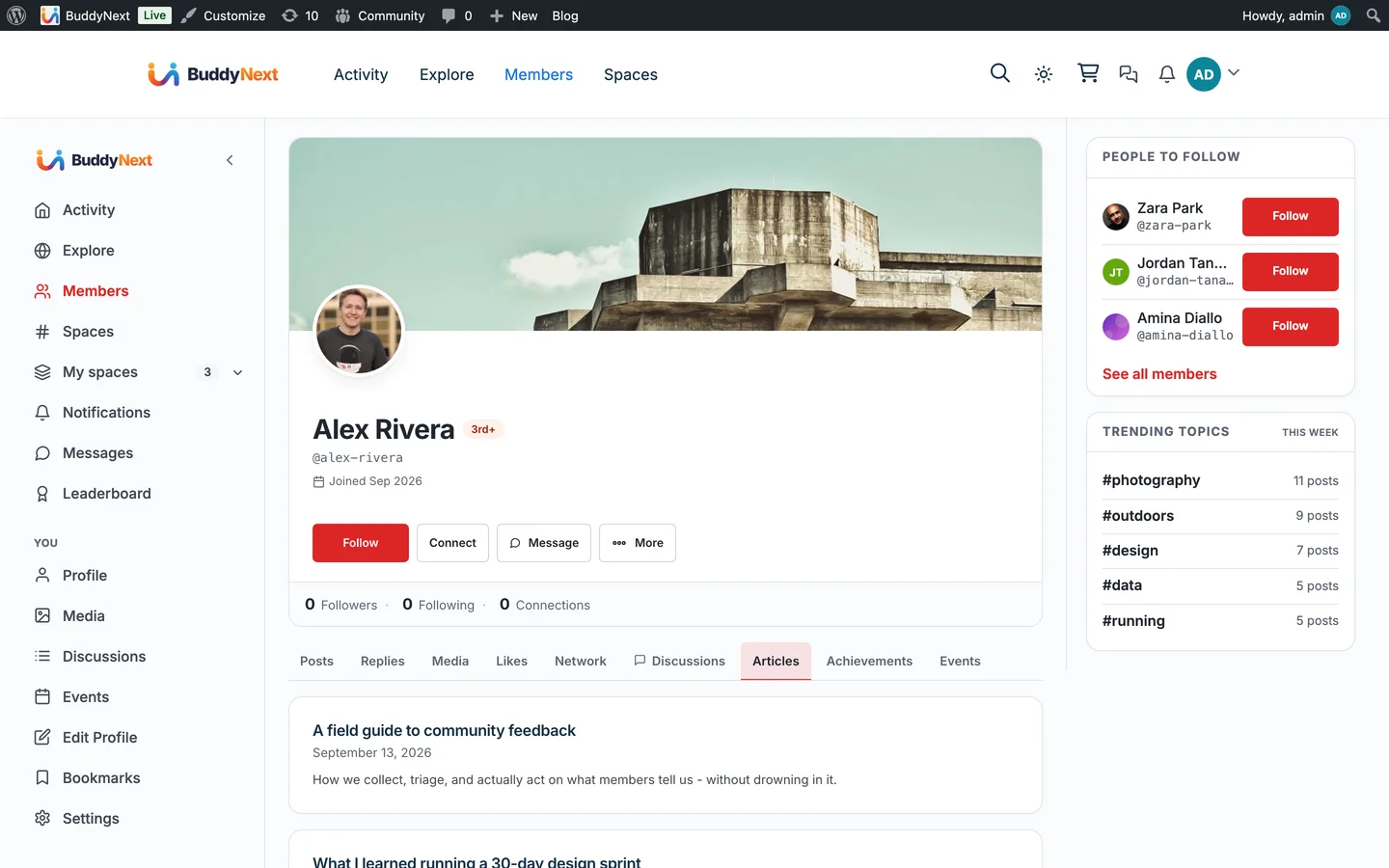
Keep everything they have written in one place on their own profile.
What changes
Writing stops disappearing down the feed a day after it is published, which is the usual reason members stop bothering.
See their own drafts and scheduled posts where they read their published ones.
What changes
Half-finished writing stays visible to its author instead of being forgotten in wp-admin.
How it works
The flow, step by step
1A member writes and publishes through WB Member Blog’s front-end editor.
2The Articles tab on their profile picks the post up and shows it with a count, newest first.
3Until it is published, the draft is visible to its author and to anyone who can edit others’ posts, and to nobody else.
4Posts written in wp-admin appear on the same tab, because the tab reads posts rather than anything Member Blog specific.
For developers
The bridge self-guards on the partner plugin and no-ops when it is absent. Key hooks: buddynext_register_nav, buddynext_site_tracking_post_types, buddynext_profile_articles_per_page.
If WB Member Blog is not installed
The Articles tab only appears when WB Member Blog is active. That is a deliberate choice rather than a technical limit: the tab reads ordinary WordPress posts, so it could run without the plugin, but showing members a writing tab on a site that gives them no way to write would be worse than not showing it.
What to check once it is on
Publish an article as a test member and confirm the tab appears on that profile with the count incremented. Then save a draft and check it from a second, non-admin account: the draft must not be visible. Finally confirm the author’s "write a new post" button lands on the front-end editor rather than wp-admin, since that route is the one thing here that depends on Member Blog’s own settings.
WB Member Blog questions
Does this put member articles into the activity feed?
The feed card comes from BuddyNext core site tracking, not from this bridge, and it works whether or not WB Member Blog is installed. What the bridge adds is the profile tab, which is where writing goes to be found later rather than scrolled past once.
Can an app or a custom front end read a member’s articles?
Yes. GET /wp-json/buddynext/v1/members/{id}/blog returns the same list as the Articles tab. Published posts are public; drafts and pending posts come back only for the author or someone who can edit them.
Are member articles searchable in the community?
No. This bridge adds no search indexing, so articles do not appear in community search results. They are found through the author’s profile or the feed.
Who can see a member’s drafts?
The author, and anyone whose role lets them edit other people’s posts. Everyone else sees only published articles on the tab.
Do posts written in wp-admin show up?
Yes. The tab lists ordinary posts by that author, so it makes no difference where they were written.
Can it list something other than posts?
Yes, through the same filter that controls which post types reach the feed, so the tab and the feed stay in agreement rather than drifting apart.
Turn it on
Setup
Default on. Install WB Member Blog and the Articles tab appears on member profiles; there is no BuddyNext setting to switch.
WBComDesigns is amazing. The WP plugins and themes are of top notch quality with lots of features and updated very frequently. Supports are very responsive and helpful. I use Reign with TutorLMS, and the experience is surprisingly smooth. The recently launched BuddyNext Pro and MediaShield Pro are…
Hoang Phan · VN ·
WBCOM Designs is Amazing!
WBCOM Designs has constantly updated and supported their plugins and themes. Recently the new BuddyNext project is Amazing! - and the new line of addons like Mediaverse, Jetonomy, Mediashield, and Listora.. are likewise Amazing! - and very well built. Today their online Chat solved a download…
Edward S. · US ·
Excellent service from Kerit Piplani…
Excellent service from Kerit Piplani and his team. Quick and efficient with my websites. I look forward to lots more business with them.
Elijah Woodarajh · ZA ·
Support is helping me with set up
Support is helping me with set up. Multisite Theme and PLugin working as expected. We are continuing with WBcom Thank You to the team
S F · CA ·
I am really glad to have known BuddyX…
I am really glad to have known BuddyX Pro Team led by Mr.Varun Dubey. I had a challenge of mobile responsiveness and after I brought the issue to their attention, they were able to address it promptly. They also made a follow-up on my experience after resolving the issue. I highly recommend WBcom…
Moses Gitonga Ntiritu · KE ·
Its response rate and working very well…
Its response rate and working very well I appreciate and am very happy to work with this webmaster.
Ali Raza · PK ·
Wonderful support!
I've been developing a relatively complex website for my business, and my development experience is pretty limited. As expected, I ran into a number of difficulties, and ach time, the Wbcom team helped me resolve my issues quickly and patiently. I can't recommend their products and support enough!
Paris · NZ ·
Prompt and Professional Support
I recently had a fantastic experience with the Wbcom Designs support team. They were incredibly prompt, warm, patient, and friendly as they helped me resolve an issue with my website. I truly appreciate the complexity of troubleshooting website-related issues, as each one is unique, and users often…
Boris Petrov · TH ·
Great support
Great support; the issue was resolved perfectly well.
Fast Incorporated · NG ·
Fantastic 6 star support
Fantastic 6 star support. I wanted to setup a membersite and tried many solutions. I contacted Wbcom for BuddyX and tried the theme with Buddypress. I am not a webdesigner or a coder, but had a requirement that was not standaard. I contacted WBcom and Pallavi helped me from start to finish with…