Probably not, if what you bought it for is working. MemberPress protects WordPress content and BuddyNext does not do that at all, so this page starts by checking you are not about to replace the wrong thing. If what you actually wanted was a community rather than a paywall, read on.
Before anything else: if you are paywalling blog posts, custom post types or downloads, you should keep MemberPress. BuddyNext does not do content protection at all, and BuddyNext Pro can take the membership grant from MemberPress, through its signed access webhook, instead of replacing it. What follows is for the smaller group who went looking for an alternative because what they actually wanted was a community, and found a paywall.
→You wanted a community and bought a paywall. MemberPress answers "can this person read this". It was never built to answer "who is in here, what are they talking about, and how do they find each other".
→There is no feed, no member profiles, no spaces and no messaging, so members pay, log in, read, and leave without ever meeting one another.
→Nothing to moderate means nothing to moderate with. That is correct for a content plugin and a real gap the day you want members posting.
→There is no free version, so you cannot prove the idea works before buying a licence.
→Selling access to content is a harder business than selling somewhere to belong, because the content has to keep being worth the renewal on its own.
None of this means MemberPress is a bad product - for plenty of communities it is the right call.
These are simply the friction points that send people looking, stated fairly.
The case for BuddyNext
Why BuddyNext is a strong MemberPress alternative.
BuddyNext is a self-hosted community platform for WordPress. The whole idea is the
opposite of renting: you own the data, you pay for hosting instead of a platform cut,
and you start free. Here is where that pays off against MemberPress.
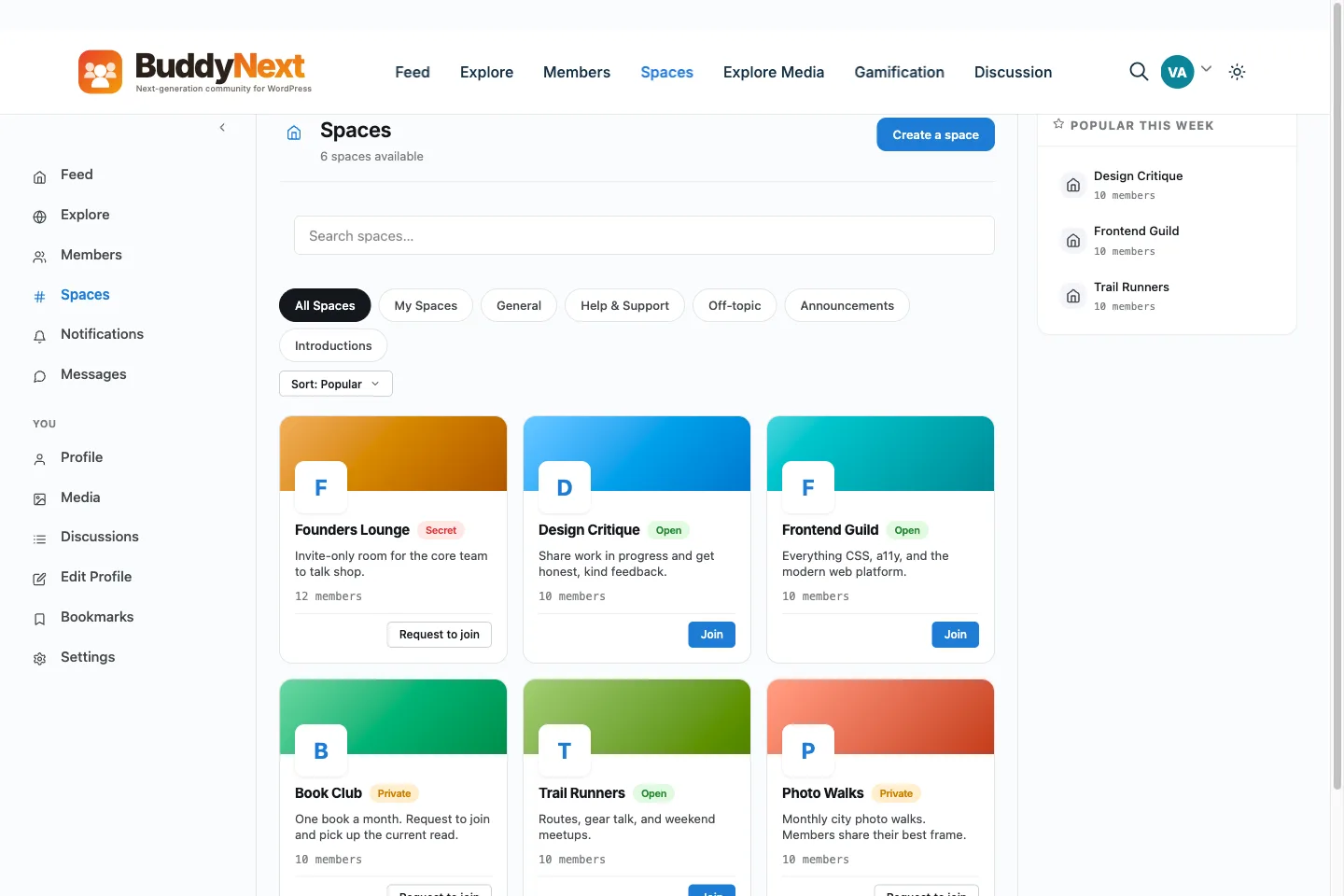
✓The community itself. Feed, spaces, member profiles, direct messages (with the free WPMediaVerse plugin), unified search and a moderation queue are what BuddyNext is, and none of them are what MemberPress does.
✓A complete free tier with no licence key and nothing that expires, so the community can be running and worth joining before anyone pays for anything.
✓It gates a place rather than a page. A plan opens spaces and lifts limits (how many spaces a member can create, how many posts they can pin, how large a group message can be) instead of answering only "can this person read this".
✓It does not need to replace MemberPress to be useful. BuddyNext Pro can take the membership grant from MemberPress through its signed access webhook or a small custom bridge, so the tool that already handles your billing keeps handling it.
There is no head-to-head page for MemberPress, because the two are not a choice
between. What BuddyNext charges for sets out the boundary, and the two can run together.
Not just us
Other alternatives to consider.
We would rather you pick the right home than just pick ours. If BuddyNext is not your
fit, these are real options worth a look - each suits a different kind of community.
Paid Memberships ProIf content protection IS the job, this is the usual comparison to MemberPress rather than anything of ours. BuddyNext bridges to it too.
LearnomyIf what you are selling is courses rather than articles, that is Learnomy in the same family, not BuddyNext.
BuddyNextThe community route: a feed, spaces, profiles and messaging, with plans that open rooms rather than unlock pages.
No fairy tales
How to switch - honestly.
For most people this is not a switch, it is an addition. Keep MemberPress selling and renewing the membership, install BuddyNext alongside it, and connect the grant through the signed access webhook in BuddyNext Pro or a small custom bridge, so a paying member lands in the community automatically. Only if the content paywall itself was the mistake does anything need turning off, and even then, move the community across first and let the two run together while you watch what members actually use.
1Plan it as a real project. A community move is migration work, not a button. Give it a window and a checklist, not an afternoon and a hope.
2Export your data first. Pull out your members, content and anything you can from MemberPress before you touch the new platform, so nothing depends on access you might lose.
3Build and test on staging. Stand up BuddyNext on a staging copy of your site, import everything, and check messaging, spaces and access actually work before any member sees it.
4Cut over and bring people across. Point your domain at the new home, invite your most active members first, and run both in parallel for a short while rather than flipping everyone at once.
Anyone selling you a magic one-click migration off a hosted platform is overselling it.
Done as a real project, though, the move is very doable - and you only do it once.
What it costs you
Honestly, where the money goes
Switching costs something either way, so here is our side of it in plain terms rather than only MemberPress's.
Free, and it is a working community
Unlimited spaces, a filterable member directory, notifications and the full report-and-moderate queue are all in the free plugin, with direct messages through the free WPMediaVerse companion. It is not a trial that expires or a seat cap you grow into.
One licence, not a shopping list
The usual cost of a self-hosted community is not the plugin, it is the six add-ons you buy to make it a community. Messaging, the member directory, notifications and the moderation queue are in the free BuddyNext plugin rather than priced separately.
Moderation is not an upsell
The report button, the admin review queue, the moderation log, and dismiss, remove, warn, strike and suspend are free. A community with no way to settle an argument is not one, so it is not sold back to you separately.
A lifetime option exists
Pro is $149 a year, or $399 once. Stop renewing and the community keeps running, because the free plugin is what it is built on rather than a crippled version of it.
MemberPress pricing: Commercial only, with no free version on wordpress.org. Sold as annual tiers, with the higher tiers adding things like the affiliate and corporate-account add-ons. List prices are discounted often enough that quoting one here would mislead - check memberpress.com for current tiers (checked mid-2026).
Sandbox demo
Try it on a live demo community
One click builds a private copy of our demo community, with members, spaces and posts already in it. InstaWP asks for an email to create it, it lasts four hours, and nobody else sees what you change.
Only if what you actually wanted was a community. MemberPress protects WordPress content - posts, pages, custom post types, categories and files - and BuddyNext does not do that at all. BuddyNext charges for access to a community: spaces, plans and perks. If you are paywalling articles or downloads, BuddyNext is the wrong tool and MemberPress is the right one.
Can I use MemberPress and BuddyNext together?
Yes, and for a lot of sites that is the right setup. BuddyNext can take the membership grant from an existing stack rather than running its own billing, so MemberPress keeps selling and renewing the membership while BuddyNext provides the community that membership gets you into. BuddyNext Pro ships ready-made bridges for WooCommerce and Paid Memberships Pro. For MemberPress, a payment tool calls the signed access webhook to grant or cancel a plan, or a developer writes a small bridge using the contract in the developer guide.
Does BuddyNext protect blog posts or custom post types?
No, and it is better to say so plainly. BuddyNext gates community access - which spaces a member can enter and what they can do inside them. It does not put a paywall on a post, a page, a custom post type or a file. That is a content-protection job and it belongs to a plugin built for it.
Is there a free membership plugin for WordPress?
No. MemberPress is commercial only, with no free version on wordpress.org, so there is a licence to buy before you can test it on a real site. BuddyNext has a complete free core with no key and nothing that expires, but they are answering different questions, so this is not a like-for-like comparison of price.
What are some alternatives to MemberPress?
For content protection with subscriptions, Paid Memberships Pro and Restrict Content Pro are the usual comparisons, and WooCommerce Memberships if you are already running WooCommerce. If what you really need is a community rather than a paywall, that is a different category, and BuddyNext is our answer in it. Check current features and pricing on each product's own site.
How much does MemberPress cost?
It is commercial only, sold as annual tiers, with no free version on wordpress.org. We are deliberately not printing a figure here: MemberPress discounts often enough that any number would be stale within a quarter, so check memberpress.com for current pricing. What is worth knowing is that it is a separate licence from anything community-related, because it does a separate job.
What is the difference between Members and MemberPress in WordPress?
They are easy to confuse by name and do unrelated things. Members is a free plugin for managing WordPress user roles and capabilities, which is about who can do what in the admin. MemberPress is a commercial membership plugin for selling access to content, which is about who can read what on the front end and how they pay for it. Neither runs a community.
WBCOM Designs has constantly updated and supported their plugins and themes. Recently the new BuddyNext project is Amazing! - and the new line of addons like Mediaverse, Jetonomy, Mediashield, and Listora.. are likewise Amazing! - and very well built. Today their online Chat solved a download…
Edward S. · US ·
WBComDesigns is amazing!
WBComDesigns is amazing. The WP plugins and themes are of top notch quality with lots of features and updated very frequently. Supports are very responsive and helpful. I use Reign with TutorLMS, and the experience is surprisingly smooth. The recently launched BuddyNext Pro and MediaShield Pro are…
Hoang Phan · VN ·
Great products and service!
Great, fast, and always very friendly and helpful service! They’re also happy to take on board ideas and suggestions for product improvements and respond very well to customer challenges.
That’s exactly what a customer imagines when thinking of perfect service! Thank you so much for this wonderful…
Horst Fuchs · DE ·
The job well done!
The job well done, well in time - Thanks so much Anmbiya and team!
Happy Client · ZA ·
High quality WordPress plugins and themes
We’ve hosted a number of Wbcom Designs clients on Levamo, and our experience with their products has been very positive. Their plugins and themes are well built, their support has been reliable, and they seem to be very innovative and constantly launching cool new products.
Michael Eisenwasser · US ·
I have worked with Wbcom Designs on…
I have worked with Wbcom Designs on several custom development requests for my WordPress platform, and my experience has been excellent.
christian nicolas · BJ ·
Love this company
Love this company. Loved the REIGN product. They were there the entire time helping me set things up; and when things went wrong? They were quick to take action and help find a solution.
Fable Fortitude · CA ·
Seriously, one of the best "software tech experiences" I've ever had!
After 16 years of buying WordPress themes and plugins, I know exactly what bad support looks like and Wbcom Designs is the polar opposite. My setup was a nightmare: multiple tools, deep integrations, custom configurations that required real back-and-forth. Most vendors would've pointed me to a…
Duston McGroarty · US ·
I was using an excellent plugin created…
I was using an excellent plugin created by Wbcom Designs and had both an error and discovered a slight bug in one aspect of the plugin. After creating a support ticket - I got a super-quick response and discovered the error was on my part and was fixed right away. Regarding the bug - I was thanked…
Edward Bonthrone · US ·
Excellent Theme, Powerful Plugins and Outstanding Support
I am using the REIGN theme and several plugins from Wbcom Designs on my website. The theme is beautifully designed, and the plugins are user-friendly. Everything works smoothly, and the features are perfect for building professional websites and communities. What impressed me most is their…