Each of these is something a member can do the day you turn it on, and what
it changes for whoever runs the place.
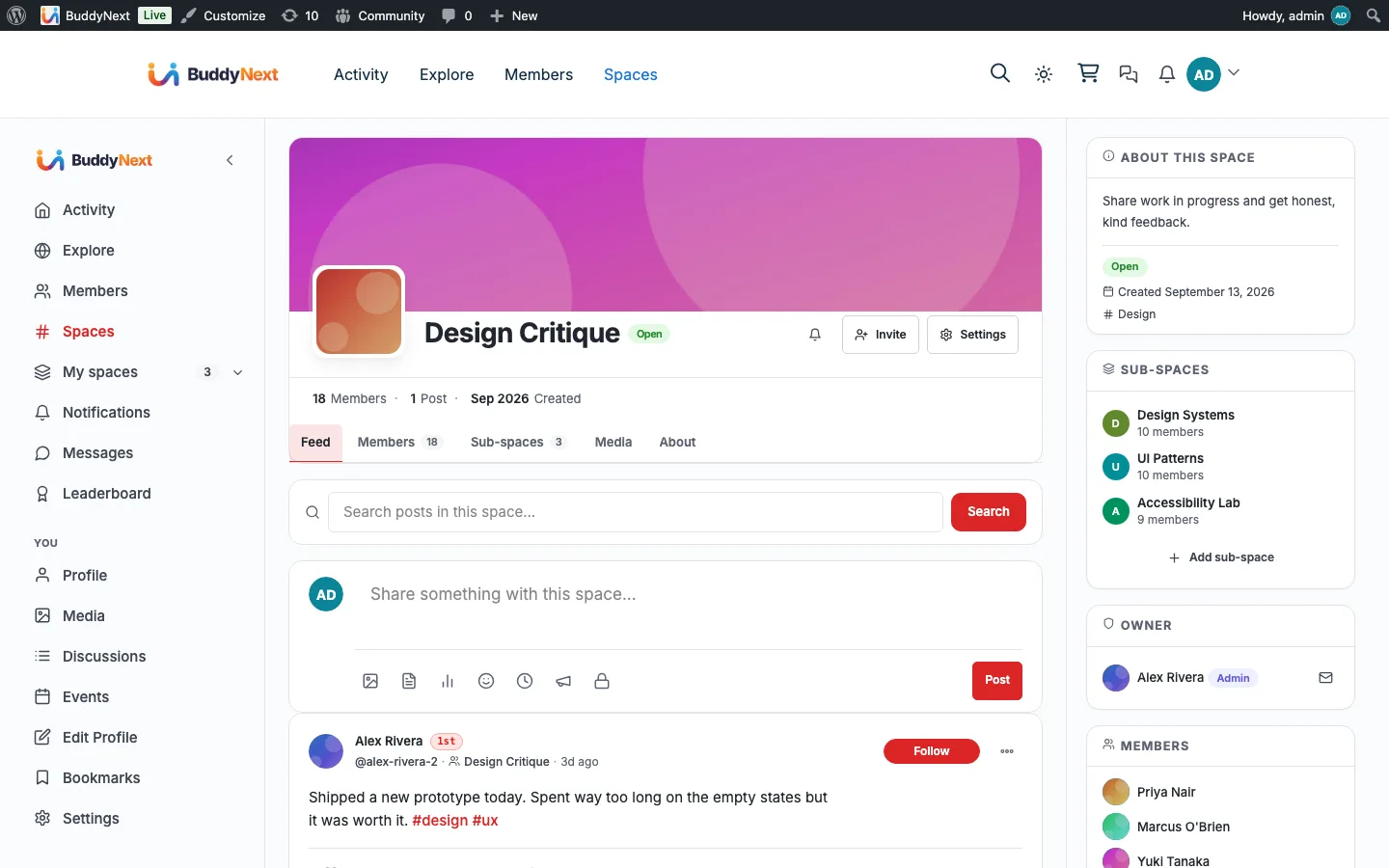
Read community and media pages full-width, instead of boxed inside the theme’s content container.
What changes
The community stops looking like a plugin bolted into a page, which is usually the first thing that makes members treat it as second-class.
Switch the site to dark mode and have the community follow on its own.
What changes
One toggle covers the whole site, so nobody is thrown by landing on a bright community page from a dark homepage.
How it works
The flow, step by step
1When BuddyX is the active theme, the bridge marks BuddyNext and MediaVerse pages as full-width so the theme skips its container wrapper.
2BuddyNext’s dark tokens respond to the theme’s dark toggle, so switching the site to dark switches the community too.
For developers
The bridge self-guards on the partner plugin and no-ops when it is absent. Key hooks: buddyx_is_full_width_page, get_template.
If BuddyX / Reign themes is not installed
This one keys off the active theme rather than a plugin, so it applies when BuddyX, BuddyX Pro or Reign is running and does nothing at all otherwise. On any other theme BuddyNext falls back to its own styling inside whatever container that theme provides, which works but will usually be boxed rather than full width.
What to check once it is on
Open a community page and a media page and confirm neither is boxed inside the theme container. Then switch the site to dark mode and check the feed, profile and messages follow rather than staying light. If one surface stays light while the rest go dark, that is a missing dark rule on that stylesheet, not a broken bridge.
BuddyX & Reign questions
Does it work with Reign as well as BuddyX?
Yes. The check covers BuddyX, BuddyX Pro and Reign, and the behaviour is the same on all three.
What does it actually change?
Layout and styling, nothing else. Community and media pages render full width, the header spacing for the bell, messages and avatar is corrected inside the theme header, and the sign-in screens run edge to edge. No data moves.
Do my theme colours carry into BuddyNext?
Not automatically. Dark mode follows the theme toggle, but the individual colours you set in the Customizer are not mapped onto BuddyNext tokens today. Set community colours in BuddyNext's own appearance settings.
Do I need to turn it on?
No, and there is no switch. It applies whenever one of those themes is active, because a theme bridge that could be left off would just mean a broken-looking community nobody diagnosed.
Turn it on
Setup
Automatic when BuddyX or Reign is the active theme. No setup, no toggle.
WBCOM Designs has constantly updated and supported their plugins and themes. Recently the new BuddyNext project is Amazing! - and the new line of addons like Mediaverse, Jetonomy, Mediashield, and Listora.. are likewise Amazing! - and very well built. Today their online Chat solved a download…
Edward S. · US ·
WBComDesigns is amazing!
WBComDesigns is amazing. The WP plugins and themes are of top notch quality with lots of features and updated very frequently. Supports are very responsive and helpful. I use Reign with TutorLMS, and the experience is surprisingly smooth. The recently launched BuddyNext Pro and MediaShield Pro are…
Hoang Phan · VN ·
Great Blog Page
They provided me great advice on how to achieve the best display and function for my blog.
Christopher Stolle · US ·
Unparalleled Service and Expertise - Wbcom Designs Goes Above and Beyond
From the moment we partnered with Wbcom Designs in 2016, they have been nothing short of phenomenal, becoming not just our go-to website developers but also treasured friends. Their team, led by the incredibly kind and competent Varun, has saved our operations on more occasions than we can count,…
Tresne Middleton · AU ·
The team at WBcom has been…
The team at WBcom has been extraordinarily helpful in taking care of the technical aspects of my website They respond quickly and address all my issues in a highly professional manner. In addition to being super attentive to the requirements of my site, they have been very patient in explaining…
Don Knowlton · BR ·
I have contact with "Wbcom Designs"…
I have contact with "Wbcom Designs" tomorrow to fix some minor issues for my website. He came to me online on chat and fixed the issues in a very short time. I really appreciate the support team member her name is "Pallavi". Thank you so much 🙏
Faisal Mehmood · PK ·
Excellent plugins and awesome service
Excellent plugins and awesome service. Very quick to respond to questions.
Jonathan · GB ·
Exceptional service by Wbcom Designs
Exceptional service by Wbcom Designs, their WordPress Development expertise is commendable. Grateful for their insightful solutions and prompt assistance.
Needhi Singh · IN ·
Recently worked with Wbcom Designs and…
Recently worked with Wbcom Designs and I was impressed with their services. They have the expertise to deliver a perfect website for my business. And one more thing the team at Wbcom Designs was very helpful they understand my every small requirement.
Kanchan Verma · IN ·
Best WordPress Development Service
Wbcom Designs are the best and very knowledgeable WordPress Development Service, as I was stuck and didn't know how to resolve the issue. Go for it Guys, without any second thoughts.