
Deploying a realtime server
Pro Features pro Pro featureReal-time WebSocket (Pro) needs a server that speaks the Pusher protocol. This page is the deployment guide: how to stand one up, put it behind HTTPS, and confirm it works before you rely on it.
If you only want to know what the feature does and what each setting means, see Real-time WebSocket.
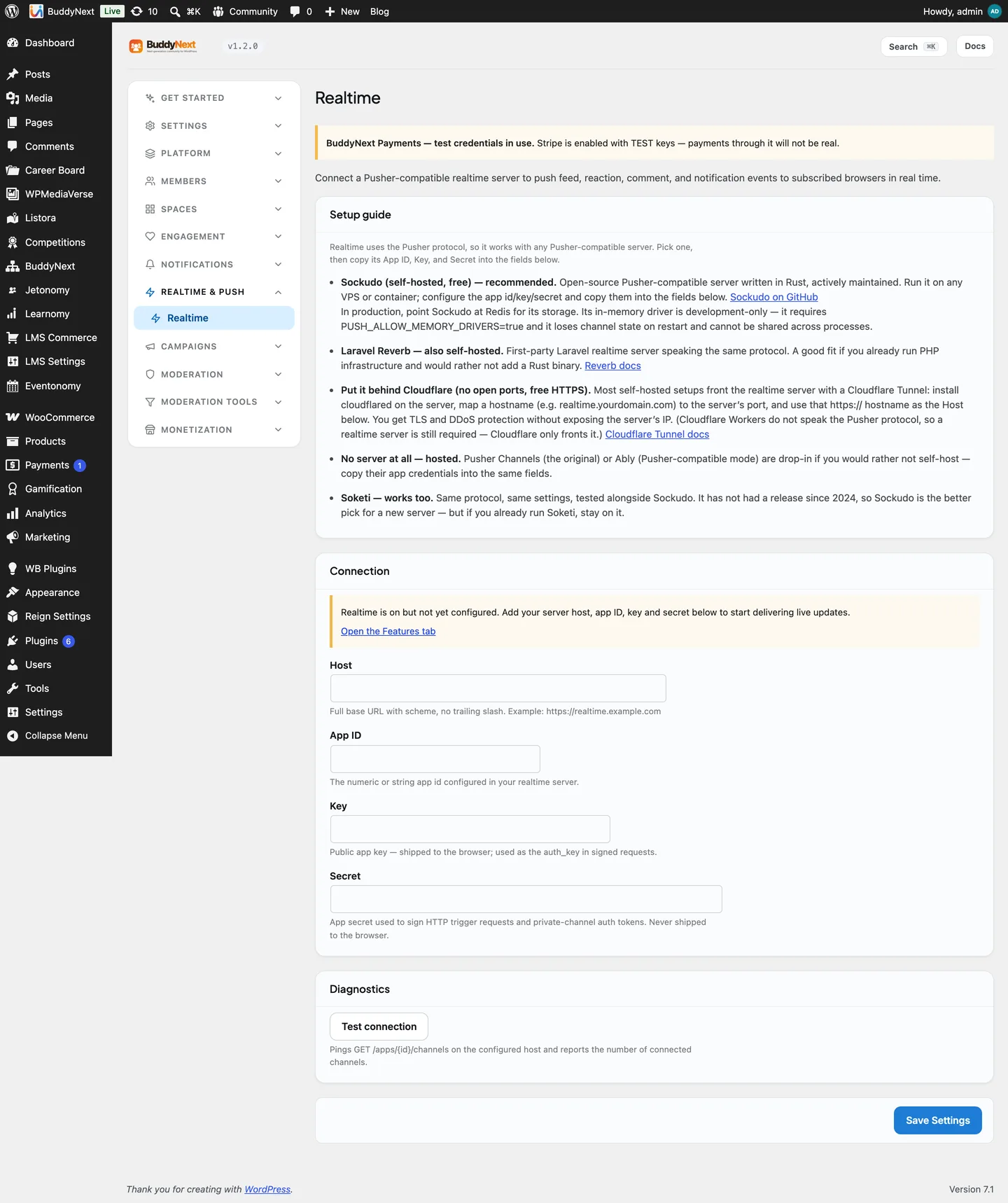
Which server should I run?#
Any Pusher-compatible server works. The settings in BuddyNext are just protocol connection parameters - host, app id, key, secret - so they are identical whichever you choose.
| Option | Self-hosted | Notes |
|---|---|---|
| Sockudo | Yes | Recommended for a new server. Open-source, written in Rust, actively maintained. |
| Soketi | Yes | Works exactly the same; we test against both. No release since 2024, so prefer Sockudo when starting fresh. |
| Laravel Reverb | Yes | First-party Laravel server. A good fit if you already run PHP infrastructure. |
| Pusher Channels | No | The original hosted service. No server to run or update. |
| Ably | No | Hosted, in Pusher-compatible mode. |
If you do not want to run a server at all, pick one of the hosted options, copy its credentials into the Realtime tab, and skip the rest of this page.
What you need#
- A small VPS or container host. Realtime connections are cheap - a 1 GB instance handles a normal community comfortably.
- A hostname you control, for example
realtime.yourdomain.com. - HTTPS. Browsers refuse insecure WebSocket connections from an HTTPS site, so this is not optional in production.
- Redis, for any real deployment. See Storage below.
Deploy with Docker Compose#
The quickest reliable path. Create a docker-compose.yml:
services:
  sockudo:
    image: sockudo/sockudo:latest
    restart: unless-stopped
    ports:
      - "6001:6001"
    environment:
      SOCKUDO_DEFAULT_APP_ID: "buddynext"
      SOCKUDO_DEFAULT_APP_KEY: "replace-with-a-random-key"
      SOCKUDO_DEFAULT_APP_SECRET: "replace-with-a-long-random-secret"
      # Storage - see the Redis section below.
      DATABASE_REDIS_HOST: "redis"
      DATABASE_REDIS_PORT: "6379"
    depends_on:
      - redis

  redis:
    image: redis:7-alpine
    restart: unless-stopped
    volumes:
      - redis-data:/data

volumes:
  redis-data:
Then:
docker compose up -d
docker compose logs -f sockudo
Generate real credentials rather than typing something memorable - the secret signs every trigger request:
openssl rand -hex 32 # run twice: once for the key, once for the secret
Keep the secret secret. The key is public and ships to the browser. The secret never leaves your servers - it signs trigger requests and channel authorization. Anyone holding it can publish events to your community.
Storage: use Redis in production#
Sockudo can keep channel state in memory, but that mode is for local development only. It requires an explicit opt-in flag (PUSH_ALLOW_MEMORY_DRIVERS=true) precisely because it is not safe for production: state is lost on every restart, and it cannot be shared across processes, so the moment you run more than one instance the two disagree about who is connected.
Point it at Redis, as the Compose file above does. Redis is also what lets you scale horizontally later without changing anything in BuddyNext.
Put it behind HTTPS#
Two common approaches. Either is fine.
Cloudflare Tunnel (no open ports)#
Install cloudflared on the server, create a tunnel, and map your hostname to the local port:
cloudflared tunnel create buddynext-realtime
cloudflared tunnel route dns buddynext-realtime realtime.yourdomain.com
cloudflared tunnel run --url http://localhost:6001 buddynext-realtime
You get TLS and DDoS protection without exposing the server's IP or opening a firewall port. Use https://realtime.yourdomain.com as the Host in BuddyNext.
Cloudflare Workers cannot replace the server. Workers do not speak the Pusher protocol, and a realtime server needs shared connection state that does not exist across edge locations. Cloudflare fronts your server; it does not become it.
Nginx reverse proxy#
If you already run Nginx with certificates, proxy to the server and let it upgrade the connection:
server {
    listen 443 ssl;
    server_name realtime.yourdomain.com;

    # ssl_certificate / ssl_certificate_key as usual

    location / {
        proxy_pass http://127.0.0.1:6001;
        proxy_http_version 1.1;
        proxy_set_header Upgrade $http_upgrade;
        proxy_set_header Connection "upgrade";
        proxy_set_header Host $host;
        proxy_read_timeout 600s;
    }
}
The Upgrade and Connection headers are the part people miss - without them the handshake fails and the connection silently falls back to polling. A long proxy_read_timeout stops idle sockets being cut every minute.
Connect it to BuddyNext#
Realtime is optional and off by default. The community works without it, using polling. To use a server:
- Go to Platform → Features and switch on Realtime. This is the one on/off switch for the feature.
- Go to Realtime & Push → Realtime and fill in the Connection fields:
| Field | Value |
|---|---|
| Host | https://realtime.yourdomain.com - full URL, with scheme, no trailing slash |
| App ID | The app id you configured (buddynext in the example above) |
| Key | The public key. It is sent to the browser. |
| Secret | The secret. It is never shown again after saving; a "Saved" badge appears, and leaving the field blank keeps the saved value. |
- Save, then press Test connection under Diagnostics.
A status line at the top of the Connection section tells you whether Realtime is off, on but not configured, or on and configured.
The Host must include
http://orhttps://. A bare hostname is refused at save, because a scheme-less host is the most common cause of a realtime server that appears configured and never connects.
Confirming it works#
The Test connection button reports what actually happened, so read its message rather than guessing:
- Success - it reports the number of connected channels. The host, app id, key and secret are all correct.
- "Could not reach the realtime server at all" - the request never got an HTTP response. This is a URL, DNS, firewall or TLS problem, and the credentials were not even checked. Confirm the scheme, that the port is open, and that the hostname resolves.
- A redirect (301/302) - almost always means the Host should be
https://rather thanhttp://. Signed requests cannot follow redirects, because following one would invalidate the signature. - 401 or 403 - the server is reachable and the app id is right; the key or secret does not match what the server was started with.
- 404 - the server does not know that app id. Check the app id, and that this hostname really is your realtime server and not another service.
For an end-to-end check, open the community in two browsers, log in as different members, and post in a space both can see. The post should appear in the second browser without a refresh.
If it stops working#
- Everything still works, just slower. That is the designed fallback: when the server is unreachable, the community reverts to polling. Nothing breaks, so check the Realtime tab rather than waiting for member reports.
- Restarting the server drops connections. Browsers reconnect automatically. If channel state matters across restarts, that is another reason to use Redis rather than the in-memory driver.
- Behind a proxy or CDN, connections drop after ~60 seconds. That is an idle read timeout on the proxy, not the realtime server. Raise it (
proxy_read_timeoutin Nginx).
Scaling#
One instance handles far more than most communities need. When you outgrow it, run several instances behind a load balancer sharing one Redis - which is why Redis is the recommended storage from the start. Nothing changes in BuddyNext: it still points at one hostname.
Related#
- Real-time WebSocket - what the feature does and what each setting means.
- Push Notifications - off-site delivery alongside live updates.