
Renewal reminders
Pro Features pro Pro featureRenewal reminders warn a member before their membership renews or ends. Two different things are happening, so they are two different emails: one tells a member their card is about to be charged again, the other tells them their access is about to run out. Sending the wrong one is worse than sending nothing.
Why use it#
A silent renewal is the single most common cause of a chargeback and an angry support ticket. The member forgot they subscribed, sees an unexplained charge, and disputes it - and a dispute costs more than the payment was worth. A short note a few days beforehand turns that into either a renewal they expected or a cancellation you keep the goodwill from.
There is also a legal dimension. EU and California auto-renewal rules require advance notice before a card is charged for a new term. Because of that, the upcoming-renewal notice is treated as transactional: it bypasses the member's email preferences and always sends. A member cannot opt out of being told their card is about to be charged, because making that a preference would make the obligation unenforceable. The expiring-soon notice is an ordinary notification and follows the member's preferences as usual.
The two messages#
| Sent when | What it says | |
|---|---|---|
| Membership renewing soon | The subscription will auto-renew | Your plan renews on this date, and this is what you will be charged |
| Membership ending soon | The subscription will lapse rather than renew | Your access ends on this date, and you can buy it again after that |
Both are ordinary BuddyNext email templates, so you can edit the wording under Settings > Email Templates like any other message.
A membership gets the ending message rather than the renewing one whenever it is not going to charge again: the member has already cancelled, the plan is a one-time purchase rather than a subscription, or the membership is billed by another system rather than by this site. That last case matters - a membership granted through WooCommerce or Paid Memberships Pro has no renewal here to warn about, so promising one would be wrong.
Members on a past-due subscription are deliberately left out. They have already had a dunning email carrying the grace deadline, and a second message about the same date would only confuse. So are lifetime plans, which have no expiry to count down to.
Setting it up (for owners)#
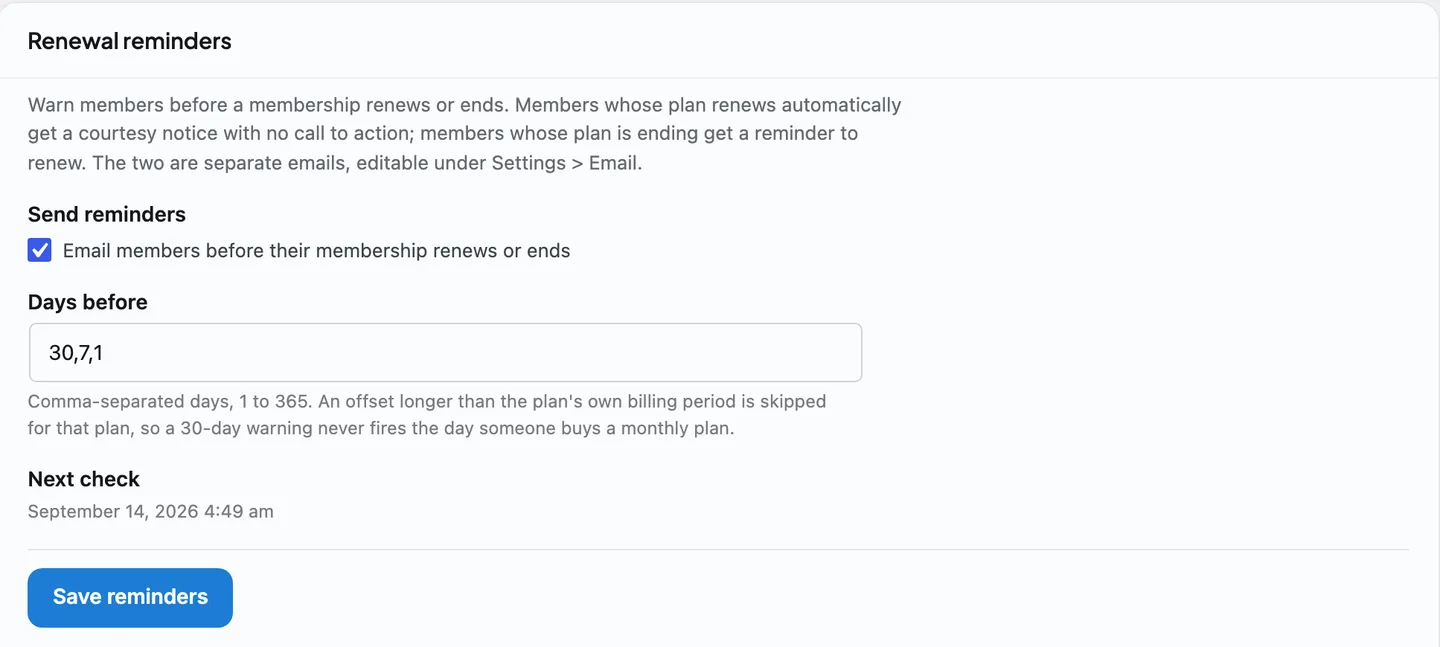
The controls live on the Subscriptions tab under Monetization, in the Renewal reminders card, below the subscriber list.
| Setting | What it does | Default |
|---|---|---|
| Send reminders | "Email members before their membership renews or ends". Turns the whole feature on or off. | See below |
| Days before | Which days to send on, as a comma-separated list of 1 to 365 | 30,7,1 |
The card also shows a read-only Next check line with the date of the next daily run.
"Days before" fires one reminder per entry, so the default sends at thirty days, seven days, and the day before. Each subscription remembers which offsets it has already been sent, so a member never receives the same reminder twice, and shortening the list later does not re-send anything.
An offset longer than the billing period is skipped. A thirty-day warning on a monthly plan would land roughly the day the member bought it, which reads as a bug and teaches people to ignore the mail. So a monthly plan configured with 30,7,1 actually sends at seven days and one day. This is why an offset you configured may never appear to fire on short plans - it is deliberate, not a fault.
Whether it starts switched on depends on the site#
- A new site starts with reminders on. A membership product that does not tell people before it charges them is broken out of the box.
- An existing site that upgrades starts with them off. An upgrade must never begin mailing an established member base because a new feature defaulted to on. Switch it on when you are ready, having first checked the wording of both templates.
If you are upgrading and you want reminders, this is the one setting you have to go and enable.
Good to know#
- Reminders are sent by a background job, so they do not depend on anyone visiting the site. The sweep processes a bounded batch each run; on a very large community a developer can raise that ceiling through the
buddynextpro_renewal_reminder_batchfilter. - Offsets can vary per subscription. The
buddynextpro_renewal_reminder_offsetsfilter receives the offsets and the subscription row, so an add-on can give one plan a different reminder schedule. Note the same name is also the option the admin screen writes; the filter runs afterwards. - Two actions fire if you want to hook your own behaviour onto a reminder:
buddynextpro_subscription_renewal_upcomingandbuddynextpro_subscription_expiring_soon, both carrying the subscription id, member, plan, expiry date and the number of days left. See the Pro and Integration Hooks reference. - A reminder is claimed before it is sent. If the send then fails, the member misses one notice rather than receiving the same one on every subsequent run. Duplicate mail to a paying member is the worse failure, so that is the trade the sweep makes.
Free vs Pro#
Renewal reminders are a Pro feature, because they exist only where there is a paid membership to renew. Free BuddyNext has no billing, so there is nothing to remind anyone about.
Related#
- Membership Plans - the subscriptions these reminders count down.
- Stripe Payments - the renewals and past-due states behind the emails.
- Email System - the templates these reminders use.