
Kudos: peer recognition
Free & ProKudos is a small, direct way for one member to recognize another - a short note of thanks or praise, sent from one profile to another. Every member can give kudos, every member can receive it, and every kudos a member has received is visible on their profile.
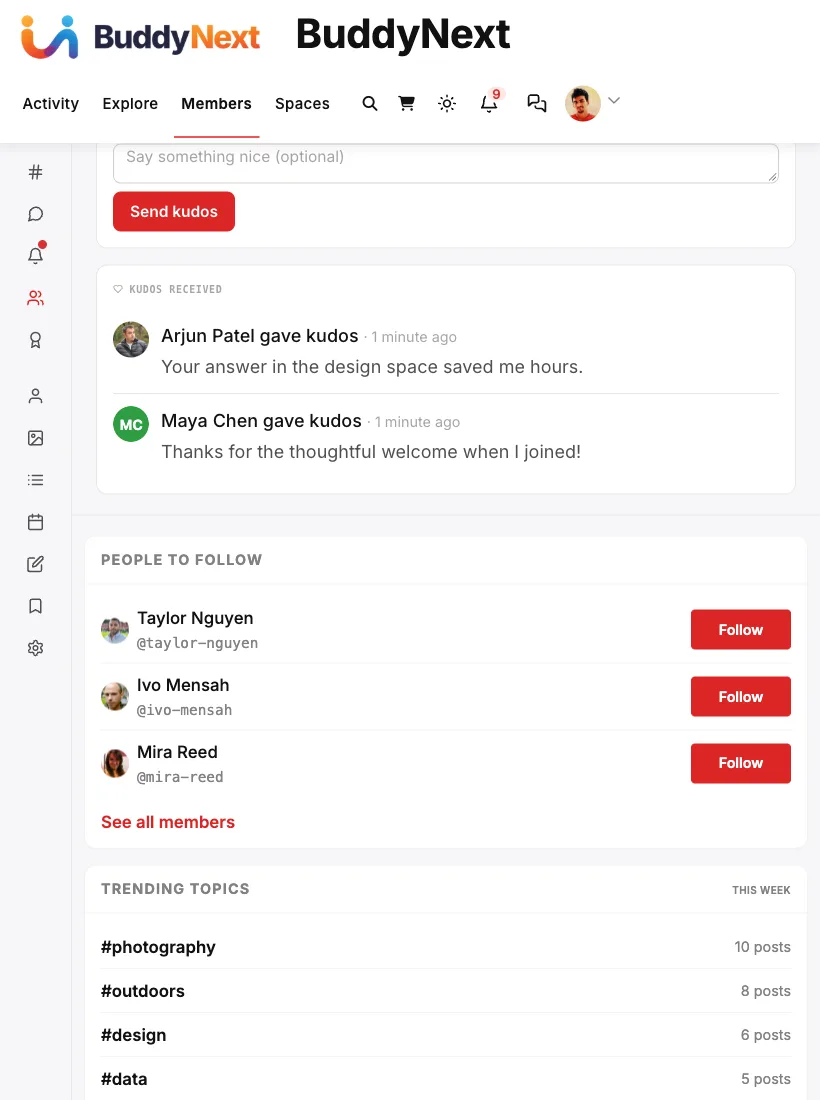
Kudos is part of gamification, provided by the WB Gamification companion plugin. It shares the Achievements area of the profile with the Achievements and Points tabs described in Gamification: points, badges, and levels.
Why use it
Points and badges reward what the system can measure - posting, reacting, joining a space. Kudos rewards what only another person can see: the teammate who helped without being asked, the answer that actually solved someone's problem, the newcomer who made someone feel welcome. It puts recognition in members' own hands instead of leaving it entirely to automated scoring.
For an owner, kudos is a low-effort way to surface the quiet contributors a leaderboard alone tends to miss - the person who never posts much but always shows up to help. It costs nothing to turn on (it just needs the WB Gamification companion), and because it is peer-given, it feels more personal to the receiver than a badge the system handed out.
How it works (for members)
Giving kudos
Open another member's profile and go to their Kudos tab. If you are signed in and are not looking at your own profile, you will see a Give kudos to [name] form: an optional short message (up to 255 characters) and a Send kudos button. Leave the message blank to send plain recognition, or add a line saying what it was for.
Kudos cannot be given to yourself, and the profile you are viewing has to belong to a real, existing member.
Receiving kudos
Every kudos you receive appears in your own Kudos tab as a feed: the giver's name and avatar, their message if they left one, and how long ago it arrived. There is nothing to configure and nothing to approve - a kudos shows up the moment it is sent.
Limits on giving kudos
Kudos is never refused for being "too many" in normal use. The limits only decide whether a kudos earns points:
- A daily points limit. Each member's first few kudos of the day earn points (5 by default, set by the owner in WB Gamification). Kudos sent after that still arrive; they just earn no points.
- A per-receiver window. After you give a member kudos, their Kudos tab shows "You gave them kudos" with the time instead of the form, for one hour by default. When the hour has passed the form comes back.
- A spam ceiling. Past a high daily ceiling (50 by default) the form is simply not shown until the next day. An ordinary member never reaches it.
Together these stop a member from inflating a friend's points in a burst, without ever turning away a genuine thank-you.
Points
Sending and receiving kudos both award points through the same gamification engine as every other action - the receiver earns more than the giver, since the point of the feature is to reward the person being recognized. See Gamification: points, badges, and levels for the values and how they fit alongside every other scored action.
Setting it up (for owners)
Kudos needs no BuddyNext setting of its own. It appears automatically once the WB Gamification companion is active, because it is part of the same Achievements area as points and badges. See Gamification: points, badges, and levels for installing the companion.
The numbers that shape kudos - the daily points limit and the points each side earns - are set in WB Gamification, not in BuddyNext:
| Setting | What it does | Default |
|---|---|---|
| Daily kudos points limit | How many kudos a member can give per day that earn points. Kudos past it still arrive. | 5 |
| Points to the receiver | Points awarded to the member who receives kudos. | 5 |
| Points to the giver | Points awarded to the member who sends kudos. | 2 |
Tip: The per-receiver window (one hour) and the spam ceiling (50 a day) are developer-level values, not admin screen fields. Change them with the
wb_gam_kudos_per_receiver_cooldown_secondsandwb_gam_kudos_daily_ceilingfilters in WB Gamification.
Turning kudos off
Kudos follows WB Gamification's own switch (Settings > Modules > Kudos). Turn it off and the Kudos tab disappears from every profile, the give form and the app's give route stop, and a member with no points or badges no longer gets an Achievements tab that would have opened on Kudos. Turn it back on and everything returns, including the kudos already received.
Moderating kudos
Kudos is member-authored content, so it can be misused - a member being pestered with unwanted kudos, or two members trading kudos back and forth to inflate their points. WB Gamification's own admin screens let a moderator review the kudos log, filter it by giver, receiver, or date, and revoke a specific kudos. Revoking reverses the points it awarded on both sides and keeps a record of the action for the audit trail; it does not delete the underlying row.
Good to know
- Kudos is separate from reactions. A reaction is a one-tap emoji on a post or comment; kudos is a deliberate, addressed note from one member to another, sent from a profile rather than from a piece of content.
- A revoked kudos stays visible in the log but not to members. Once a moderator revokes a kudos, it drops out of the receiver's Kudos feed and its points are reversed on both sides, but the record itself is kept (not deleted) so there is a history of what happened.
- The Kudos tab is where a member with nothing else lands. If a member has no badges and no points yet, opening their Achievements area goes straight to Kudos rather than to an empty Achievements sub-tab, since anyone - even a brand-new member - can already have kudos to give or receive.
- Works over the API too. Giving kudos is also available as a REST action (
POST /buddynext/v1/kudos) for the mobile app, enforcing the same rules as the web form: no self-kudos, points only within the daily points limit and outside the per-receiver window, and a refusal past the spam ceiling.
Free vs Pro
Kudos works the same whether or not BuddyNext Pro is active. Like the rest of gamification, it depends on the WB Gamification companion plugin, not on a Pro license.
Related
- Gamification: points, badges, and levels - the points kudos awards, and the tabs it sits alongside
- The community leaderboard - where accumulated points (including kudos points) are ranked
- WB Gamification - the companion plugin that owns kudos, its limits, and moderation