
Hooks: Search, Hashtags, Sidebar, and Admin
Developer Guide Free & ProThe action and filter seams for unified search, the hashtag system, the search index, the right-sidebar widgets (greeting, streak, this-week stats, leaderboard, gamification overlays), and the admin information architecture. This page is for developers building search drivers, hashtag analytics, gamification sidebars, or admin extensions that add or relocate settings tabs. Every hook below is fired or applied by BuddyNext Free, so it is available without Pro - and the Pro search seams (buddynext_search_query_args / buddynext_search_filter_options) are listed here because they are the points Pro plugs its advanced member filters into.
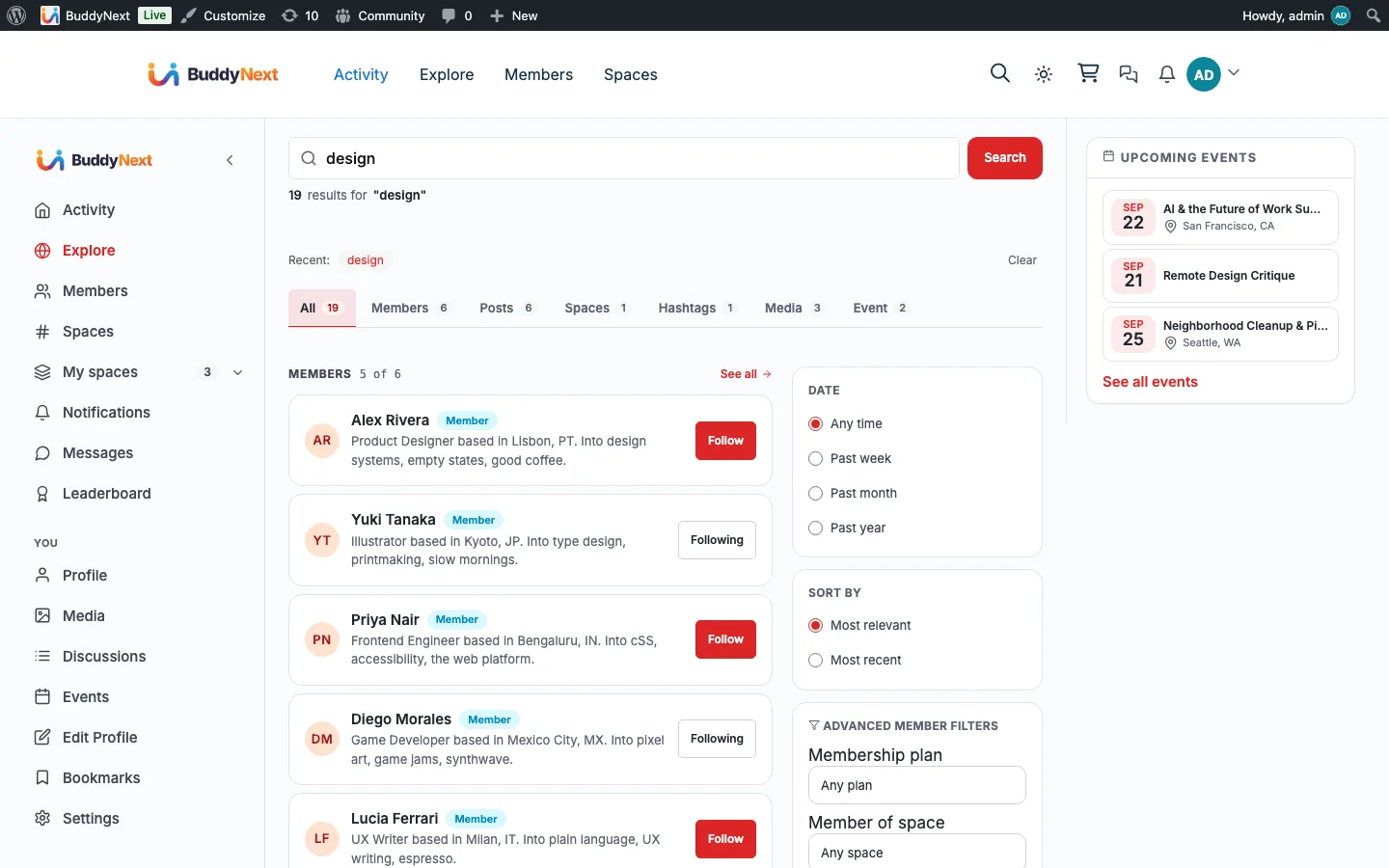
Overview / Contract#
- Search has a layered extension model. You can replace the entire result set with an external driver (
buddynext_search_results), shape the query args before the built-in SQL runs (buddynext_search_query_args), enrich each row after it returns (buddynext_search_item), or react to a completed search (buddynext_search_performed). Pick the lowest-impact seam that does the job. - Do not drop rows in
buddynext_search_item. That filter is mutate-only. Removing items there desyncs thetotalcount and the cursor. To exclude results, constrain the query throughbuddynext_search_query_args. - Sidebar gamification seams are null-default overrides. Every
buddynext_user_weekly_*,buddynext_user_activity_*, andbuddynext_user_active_datesfilter passesnullby default; BuddyNext runs its own inline SQL only when the filter returnsnull. A gamification plugin returns its canonical value to take over, and BuddyNext skips the query entirely. - Admin tabs register against their origin section, then the hub places them. A registrar always passes its own domain section to
register_tab(); the canonicalTAB_PLACEMENTmap (filtered bybn_admin_hub_tab_placement) decides the final section, sidebar position, and visibility. This keeps the information architecture in one place while every feature stays decoupled.
Search seams#
| Hook | Type | Fired when | Parameters |
|---|---|---|---|
buddynext_search_results |
filter | Before the built-in SQL runs; return a non-null result set to bypass BuddyNext's query entirely (external search driver) | null|array $result, string $query, string $type, int $per_page, int $page |
buddynext_search_query_args |
filter | The query args are assembled, before the built-in SQL builds its WHERE clauses (the Pro advanced-filter seam: plan, space, member-label, joined-after) | array $args, string $query, int $viewer_id |
buddynext_search_item |
filter | Once per result row on the built-in SQL path (mutate-only; does not run when a driver short-circuits) | array $item, string $query, string $type, int $viewer_id, array $args |
buddynext_search_performed |
action | A search has completed and the result set is finalised | string $query, int $viewer_id, array $args, array $results |
buddynext_search_filter_options |
filter | The advanced member-search controls are populated (Pro supplies plan / space / member-label option lists; empty groups hide their control) | array $options, int $viewer_id |
buddynext_search_viewer_spaces |
filter | The spaces whose content a logged-in viewer may find, resolved from membership. Answer with ADDITIONAL space ids the viewer may read without having joined (Pro adds gated spaces whose required_ability they hold). Widening only: membership ids are re-added regardless, and every addition is verified against can_view_content() before it is honoured, so a listener cannot grant reach into a space the viewer may not read |
int[] $space_ids, int $viewer_id |
buddynext_search_entitled_space_limit |
filter | How many entitled-but-unjoined spaces a single search will verify. Each costs a space fetch and an ability check, so the list is cut rather than allowed to grow. Default 200 |
int $limit, int $viewer_id |
buddynext_search_member_meta_html |
filter | A member row in the results renders its meta line. Return pre-escaped HTML. | string $html, int $member_id |
buddynext_search_before / buddynext_search_after |
action | Around the search results page body | int $current_user_id |
buddynext_search_saved_searches |
filter | The search page decides whether to show the Saved searches card to a signed-in member. Default false; return true only when you serve the saved-search routes the card talks to (Pro does). The card is never shown without it, so members never see a control that cannot work |
bool $enabled |
buddynext_search_space_object_type |
filter | A space is (re)indexed. Return another slug to list that space in its own search section and tab instead of Spaces (since 1.2.2) | string $type = 'space', array $space_row |
buddynext_route_core_search |
filter | A front-end core ?s= search runs (not a BuddyNext hub). Return true to redirect it to the community search page. Default false since 1.2.4: core, theme and WooCommerce search stay with WordPress, and the theme's results page links to community results instead |
bool $route |
buddynext_search_type_labels |
filter | The search page names its extra-type sections and tabs | array<string,string> $labels (type slug => plural label) |
Note:
buddynext_search_query_argsis where themember_label,tier_slug,space_id, andjoined_afterkeys enter the query. BuddyNext Free reads any of those keys if present, but only BuddyNext Pro populates them (and populatesbuddynext_search_filter_optionsso the controls appear). The page degrades cleanly with Pro inactive: no provider, no control.
Your own search section for some spaces#
BuddyNext lists every space under Spaces. A plugin that treats some spaces as its own product (a "Circles" category, say) can list them under their own heading and tab instead. Everything else about them stays a space: the link is the space's page, and private and secret spaces keep their visibility rules.
// File spaces in category 12 under "circle".
add_filter( 'buddynext_search_space_object_type', function ( string $type, array $space ): string {
    return 12 === (int) $space['category_id'] ? 'circle' : $type;
}, 10, 2 );

// Name the section and tab.
add_filter( 'buddynext_search_type_labels', function ( array $labels ): array {
    $labels['circle'] = __( 'Circles', 'my-plugin' );
    return $labels;
} );
The type applies when a space is next indexed: on save, or run Tools > Rebuild search index once after adding the filter. A space shows under one type only, and moving it back to space removes the old row.
scope_space_id - search inside one space#
scope_space_id is a Free key on the same filter. It restricts content results to a single space, narrowing the existing visibility rules rather than replacing them, and it is what powers the in-space search box on a space's Feed tab.
add_filter( 'buddynext_search_query_args', function ( array $args, string $query, int $viewer_id ): array {
    $args['scope_space_id'] = 42;   // content from space 42 only
    return $args;
}, 10, 3 );
Do not reach for space_id to do this. The two keys look interchangeable and are not:
| Key | Owner | Means | Applied by |
|---|---|---|---|
scope_space_id |
Free | Restrict content rows to one space | si.space_id = N, a key lookup on the space BTREE index |
space_id |
Pro | Members of this space | A join against bn_space_members on buddynext_search_advanced_where |
space_id is one of Pro's five advanced keys, and AdvancedSearchFilters::apply_pro_args() strips it whenever the viewer fails the search.saved_advanced entitlement - which includes every anonymous visitor. Scoping a free feature to it would work on a Free-only site and then silently stop working the moment monetization was switched on, handing the member the whole community's results while the interface told them they had searched one space. Two concerns, two keys, deliberately.
scope_space_id is not applied to member searches (user and member types), because user rows carry no space_id of their own and the column test would match nothing.
Hashtag seams#
| Hook | Type | Fired when | Parameters |
|---|---|---|---|
buddynext_hashtag_pattern |
filter | The regex used to extract hashtags from content (default /#([\p{L}][\p{L}\p{N}_]{0,49})/u) |
string $pattern |
buddynext_hashtag_used |
action | A hashtag is recorded against a piece of content (fires once per tag) | string $tag, int $object_id, int $user_id |
buddynext_hashtag_related_discussions |
filter | The "related discussions" list on a hashtag feed is built (Jetonomy supplies discussions here) | array $discussions, string $hashtag_slug |
buddynext_hashtag_feed_before / buddynext_hashtag_feed_after |
action | Before and after the hashtag feed page body. Use _after to add a block under the feed |
- |
The hashtag system also exposes the full buddynext_part_hashtag_* template-part family (hero, posts list, sidebar-about, sidebar-related, sidebar-top-contributors, empty-state), each with the standard _before / _after / _args / _classes four-hook contract. See Hooks: Template Parts for that convention.
Search index#
| Hook | Type | Fired when | Parameters |
|---|---|---|---|
buddynext_reindex_complete |
action | A full search-index rebuild finishes | - |
buddynext_index_user |
action | A user is (re)indexed into the search index | int $user_id |
Sidebar and gamification seams#
The right sidebar is the main surface a gamification plugin augments. The greeting/streak card, the this-week stats card, and the profile hero all expose override filters that default to null or empty, so BuddyNext computes a fallback only when nothing hooks them.
Sidebar injection points#
| Hook | Type | Fired when | Parameters |
|---|---|---|---|
buddynext_right_sidebar |
action | Inside the right-sidebar column, on every hub that opts in | string $hub |
buddynext_leaderboard_before / buddynext_leaderboard_after |
action | Before and after the leaderboard page body. Use _after to add a section under the standings |
- |
buddynext_greeting_string |
filter | The personalised greeting line in the sidebar card is built | string $greeting, int $hour, WP_User $user |
buddynext_profile_hero_badges_html |
filter | The badge strip on a profile hero renders (return pre-escaped HTML; default empty) | string $html, int $user_id |
Streak override filters (greeting/streak card)#
| Hook | Type | Fired when | Parameters |
|---|---|---|---|
buddynext_user_active_dates |
filter | Resolving which days a member was active in the trailing window | array|null $dates, int $user_id, int $window_days |
buddynext_user_activity_streak |
filter | Resolving the current consecutive-day streak | int $streak, int $user_id |
buddynext_user_activity_best_month_streak |
filter | Resolving the best run within the current month | int $best, int $user_id |
This-week stats override filters#
Each metric on the this-week stats card defaults to null so a gamification plugin can supply its canonical figure; the inline COUNT runs only on a null return.
| Hook | Type | Fired when | Parameters |
|---|---|---|---|
buddynext_user_weekly_notifications_count |
filter | Notifications received in the last 7 days | int|null $count, int $user_id |
buddynext_user_weekly_notifications_prev_count |
filter | Notifications received in the prior 7 days (for the week-over-week delta) | int|null $count, int $user_id |
buddynext_user_weekly_notifications_read_count |
filter | Notifications read in the last 7 days | int|null $count, int $user_id |
buddynext_user_weekly_followers_gained |
filter | Followers gained in the last 7 days | int|null $count, int $user_id |
buddynext_user_weekly_engagement_received |
filter | Reactions + comments received in the last 7 days | int|null $count, int $user_id |
Tip: Returning a real value from any of these short-circuits BuddyNext's own query, so an integration that already tracks the metric removes that query from the page render. Return
nullto fall back to BuddyNext's computation.
Admin information-architecture seams#
The admin hub owns the BuddyNext top-level menu and arranges every settings tab into a fixed set of sections (Settings, Platform, Members, Spaces, Engagement, Notifications, Realtime and Push, Campaigns, Moderation, Moderation Tools, Monetization). A section appears in the sub-menu only once a tab is registered into it.
| Hook | Type | Fired when | Parameters |
|---|---|---|---|
bn_admin_hub_sections |
filter | The section map is resolved; add, rename, or reorder top-level admin sections | array $sections |
bn_admin_hub_tab_placement |
filter | The tab-placement map is resolved; move, reorder, or hide any registered tab | array $map |
bn_admin_hub_default_icon_map |
filter | The fallback tab-slug -> icon map is resolved | array $map |
bn_admin_hub_pages |
filter | The admin page catalogue (used by the command-palette index) is built | array $catalogue |
buddynext_settings_tab_subtitles |
filter | Per-tab subtitle strings shown under the tab heading | array $subtitles |
buddynext_admin_license_tab_content |
action | The Get Started > License tab renders (Pro hooks its activate/deactivate form here) | - |
buddynext_profile_field_types |
filter | The available custom-profile-field type list is built | array $types |
buddynext_profile_field_type_labels |
filter | Field-type labels for the admin UI | array $labels |
buddynext_before_edit_member_form / _after_edit_member_form |
action | Around the admin member-edit form | int $user_id, WP_User $wp_user |
buddynext_outbound_webhook_limit |
filter | The max number of outbound webhooks an admin can register | int $limit |
buddynext_search_fuzzy_max_rows |
filter | The largest search index on which the fuzzy fallback still runs | int $max_rows |
buddynext_explore_aside_pulse |
action | Fires at the top of the Explore sidebar, for a live community-pulse card | int $uid |
buddynext_nav_icon_choices |
filter | The icon slugs offered by the nav-item picker. Any slug in assets/icons/ works whether or not it is listed here; this only shapes the picker |
string[] $icons |
buddynext_object_cache_warn_threshold |
filter | The member count above which a missing persistent object cache is worth warning the owner about | int $threshold |
buddynext_feature_labels |
filter | Feature labels and descriptions are read for the Settings screen, after init. An add-on that adds features through buddynext_features supplies its translated strings here (the catalog itself is read too early to translate). Since 1.2.4. |
array $labels (feature slug => label, description) |
buddynext_theme_container_width |
filter | BuddyNext resolves the width for the "Theme default" container setting. Classic themes that keep their width in a theme setting rather than theme.json return it here; 0 falls back to 1200. Since 1.2.4. | int $px |
buddynext_integration_search_enabled |
action | An integration's search indexing is switched ON. The integration's own bridge listens for its key and backfills | string $key |
buddynext_integration_reindex_ids |
filter | BuddyNext is re-indexing an integration's content for search, a batch at a time (after its search was switched back on). The bridge returns its next item ids in ascending order. | int[] $ids, string $key, int $after_id, int $limit |
buddynext_integration_reindex_item |
action | One item from the batch above is to be indexed. The bridge runs its own sync for it. New activity cards are switched off for the call, so old content is not posted to the feed again. | string $key, int $id |
buddynext_search_item_url |
filter | A search result of a type BuddyNext does not route itself needs its link. A bridge whose content is not a WordPress post (a forum topic, an event) returns the URL. | string $url, string $type, int $object_id (default '') |
buddynext_search_prime_item_urls |
action | The links for a page of search results are about to be built. A bridge whose results need a lookup per row loads them all here, in one query, and then answers buddynext_search_item_url from what it loaded. |
array<string,int[]> $by_type (result ids keyed by object type) |
buddynext_integration_search_disabled |
action | An integration's search indexing is switched OFF, so its bridge can clear what it indexed | string $key |
Note:
bn_admin_hub_sectionsandbn_admin_hub_tab_placementuse the internalbn_*prefix because they wire admin chrome. They are stable extension points, but treat the section/tab keys as the public contract rather than the surrounding admin classes. See Hooks Overview for thebuddynext_*vsbn_*distinction.
More admin, routing, and platform seams#
Narrower hooks around the admin screens, URL routing, the page head, and rendering. Same table shape as above.
Admin screens#
| Hook | Type | Fired when | Parameters |
|---|---|---|---|
buddynext_admin_menu_sections |
filter | The admin menu decides which hub sections keep a WP admin menu link (default get-started, members, moderation, settings). |
string[] $keys |
buddynext_admin_docs_url |
filter | The admin "Docs" button builds its link. The default points at the guide for the current section and tab. | string $url, string $section, string $tab |
buddynext_admin_notice_owner_dirs |
filter | The Hub strips other plugins' admin notices. Add your plugin's directory so its notice survives on Hub screens. | string[] $dirs (normalised, trailing-slashed paths) |
buddynext_settings_tabs |
filter | The Settings hub tab strip is built. Register your own section as slug => label; the slug must resolve through PageRouter::settings_url() and you provide the template. |
array $tabs, string $active |
buddynext_settings_tab_reset |
action | An admin resets a settings tab to its declared defaults. | string $tab, string[] $keys, int $user_id |
buddynext_export_option_is_sensitive |
filter | The settings export decides whether a BuddyNext option is sensitive and must be left out. | bool $sensitive, string $name |
buddynext_export_option_prefixes |
filter | The settings export decides which option-name prefixes it covers, and the import writes only options with one of them. Pro adds its own. | string[] $prefixes |
buddynext_webhook_event_catalogue |
filter | The outbound-webhook event list is built for the settings screen (slug => label). Pro adds its membership and payment events here. |
array $catalogue |
buddynext_pro_upgrade_url |
filter | The "Upgrade to Pro" link is built. | string $url |
buddynext_recommended_defaults |
filter | The recommended first-run option values are read. | array $map (option name => value) |
buddynext_wp_cron_disabled |
filter | BuddyNext decides whether WP-Cron can be trusted to fire a scheduled event. Defaults to the DISABLE_WP_CRON constant or a detected dead cron. Return false if you run a real system cron. |
bool $disabled |
buddynext_setup_complete |
action | The admin setup wizard is completed. | none |
buddynext_insights_after |
action | At the end of the Insights tab. Pro renders its analytics suite below the Free summary here. | none |
buddynext_community_admin_before / buddynext_community_admin_after |
action | Before and after the Community Admin inner content. | none |
buddynext_edit_member_sections |
action | Inside the Account tab of the admin edit-member form, for member-level sections such as member type or labels. | int $user_id, WP_User $user |
buddynext_admin_member_profile_saved |
action | After an admin saves a member's profile. Receives the sanitized BuddyNext field map, not raw $_POST. |
int $user_id, WP_User $user, array $profile_data |
Routing, head, and rendering#
| Hook | Type | Fired when | Parameters |
|---|---|---|---|
buddynext_rest_init |
action | Before BuddyNext registers its REST routes, in the same rest_api_init pass. Register routes under buddynext/v1 here. |
none |
buddynext_rest_routes_registered |
action | After all core REST routes are registered. Use it to decorate or override a core endpoint. | none |
buddynext_create_hub_page |
filter | A hub's backing page is missing and BuddyNext is about to create it. Return false to stop. |
bool $create, object $hub |
buddynext_client_nav_deny_patterns |
filter | The client router builds the URL patterns it must never swap in place (full page loads only). | string[] $patterns (regex fragments) |
buddynext_keyboard_shortcuts_enabled |
filter | The single-key shortcuts (n, /, g then f) are switched on or off. On by default; __return_false turns them off. |
bool $enabled |
buddynext_meta_description |
filter | The community meta description tag is built. Return '' to drop the tag. |
string $description |
buddynext_seo_plugin_active |
filter | BuddyNext decides whether an SEO plugin owns the page head. | bool $active |
buddynext_head_meta_image |
filter | The fallback social image is chosen for a surface with no image of its own. | string $url |
buddynext_template_html |
filter | A BuddyNext template's rendered HTML. Only runs when a callback is attached. The template has already escaped its output; you own the safety of what you return. | string $html, string $relative, string $path |
buddynext_theme_token_map |
filter | The host-theme token map is built. Return --bn-token => value pairs to point BuddyNext's tokens at a theme's variables; an empty array means no adoption. |
array $map, string $template |
buddynext_host_themes_with_color_mode |
filter | Appearance > Default theme is rendered. Return the theme slugs whose own light/dark mode beats the Default theme; those themes get a note on the field. | string[] $slugs |
buddynext_asset_isolation_enabled |
filter | Asset isolation on BuddyNext routes is about to run (default true). |
bool $enabled |
buddynext_late_print_script_modules |
filter | The late script-module print pass is about to run. | bool $enabled |
buddynext_time_ago_date_format |
filter | A timestamp is too old for relative time and needs a date format (default j F, or j F Y outside the current year). |
string $format, bool $is_current_year, string $gmt_datetime |
buddynext_pwa_offline_page |
filter | The PWA offline fallback page HTML is built. | string $html |
buddynext_nav_tabs |
filter | The main-nav tab catalogue is built. A tab a plugin adds here with a URL also surfaces as a rail link. | array $tabs |
buddynext_nav_show_tab_count |
filter | A nav item that would skip its count asks whether to resolve it anyway (default false). |
bool $show, object $item |
buddynext_fallback_nav_excludes |
filter | The fallback page-list nav omits these BuddyNext pages. | array $excludes, bool $logged_in |
buddynext_companion_activation_redirect_keys |
filter | The setup wizard clears "just activated, redirect me" transients after activating a companion plugin. | array $map, string $basename (plugin slug => transient keys) |
Examples#
Relocate an admin tab via bn_admin_hub_tab_placement#
The placement map is keyed by a tab's origin section:slug. Each rule can set the final section, the sidebar position (lower sorts earlier), or hidden. This moves the webhooks tab out of Settings into Notifications, and hides the social-connections tab entirely:
add_filter(
	'bn_admin_hub_tab_placement',
	function ( $map ) {
		// Move the webhooks tab from Settings to the Notifications section.
		$map['settings:webhooks']['section']  = 'notifications';
		$map['settings:webhooks']['position'] = 40;

		// Hide a tab without touching the code that registers it.
		$map['settings:social']['hidden'] = true;

		return $map;
	}
);
To add a brand-new top-level section for your own tabs to live in, register it first via bn_admin_hub_sections (it stays hidden until a tab lands in it):
add_filter(
	'bn_admin_hub_sections',
	function ( $sections ) {
		$sections['marketplace'] = array(
			'slug'  => 'buddynext-marketplace',
			'label' => __( 'Marketplace', 'my-ext' ),
		);
		return $sections;
	}
);
Add a sidebar widget seam via buddynext_right_sidebar#
buddynext_right_sidebar fires inside the right-sidebar column on every hub that opts in, passing the current hub slug so you can scope your widget to specific surfaces:
add_action(
	'buddynext_right_sidebar',
	function ( $hub ) {
		// Only show this widget on the home feed and the explore hub.
		if ( ! in_array( $hub, array( 'home', 'explore' ), true ) ) {
			return;
		}

		printf(
			'<section class="bn-sidebar-card my-streak-widget"><h3>%s</h3><p>%s</p></section>',
			esc_html__( 'Your reputation', 'my-ext' ),
			esc_html( my_gamification_reputation_line( get_current_user_id() ) )
		);
	}
);
Supply a gamification streak so BuddyNext skips its own query#
add_filter(
	'buddynext_user_activity_streak',
	function ( $streak, $user_id ) {
		// Our plugin already tracks streaks - return ours and BuddyNext
		// skips its 30-day UNION query for this card.
		return (int) my_gamification_current_streak( $user_id );
	},
	10,
	2
);
Notes and gotchas#
- Choose the right search seam. Use
buddynext_search_query_argsto constrain or extend the query,buddynext_search_resultsto replace the engine wholesale, andbuddynext_search_itemonly to annotate rows. Never delete rows inbuddynext_search_item- it breaks pagination totals. - The Pro search filters are present but unpopulated in Free.
buddynext_search_query_argsandbuddynext_search_filter_optionsare the exact points BuddyNext Pro injects advanced member filters; your own driver can use the same keys without Pro. - Sidebar override filters trade a query for your value. Returning a real value from the
buddynext_user_weekly_*/buddynext_user_activity_*filters removes the corresponding inline query from the page render. Returnnullto keep BuddyNext's fallback. - Admin sections are hidden until populated. Registering a section via
bn_admin_hub_sectionsdoes not show it; it appears only once a tab is placed into it. Hidden tabs ('hidden' => true) still keep their registration, so removing the filter restores them. - Free vs Pro. Every hook here is Free. Pro contributes tabs into the same hub sections, populates the same search filters, and can override the same sidebar metrics - there is no separate Pro hub or Pro search pipeline. For the moderation, safeguard, and authentication seams, see Hooks: Moderation, Trust, and Authentication.