
Navigation API: add menus and tabs
Developer Guide Free & ProHow to add a menu item or a tab to BuddyNext from an addon or a theme. BuddyNext has four distinct navigation surfaces and they take different APIs: the declarative Nav registry that owns member-profile and space tabs, the global left-rail filter, the mobile bottom bar, and the header account dropdown. This page covers all four, names the seams, and gives a working recipe for each. Every one of them is also a scope the site owner can override in Settings -> Navigation, so the precedence rules matter as much as the registration API.
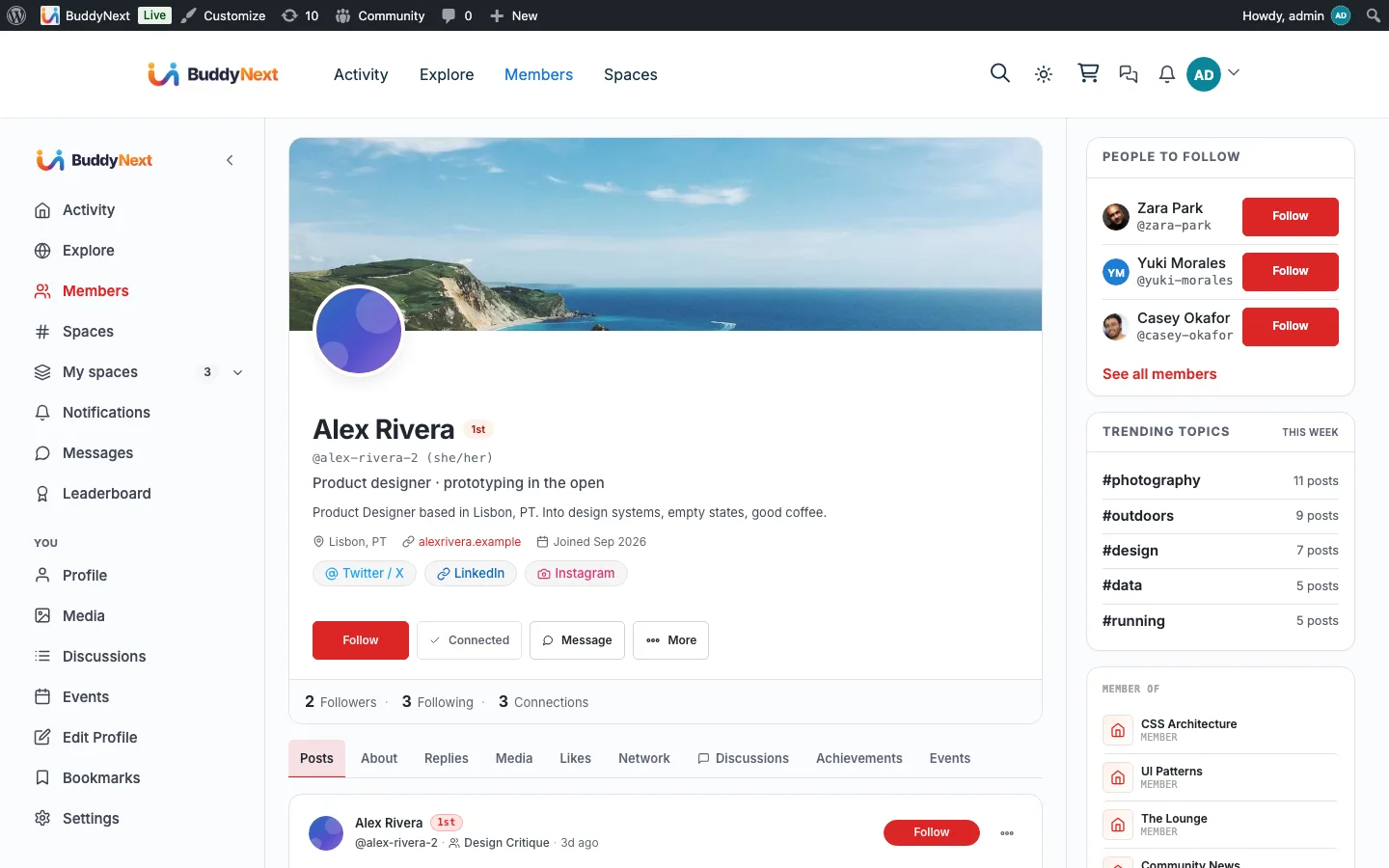
Runnable, tested snippets: every recipe below has a copy-paste, live-verified version in
buddynext/buddynext-snippetsundernavigation/(add-profile-tab.php,add-space-tab.php,add-rail-item.php,relabel-remove-nav.php). Drop one inwp-content/mu-plugins/and it works as-is.Current API (important): a profile OR space tab is a single
$registry->register([...])call that carries both a lazyurland arendercallable -PanelRendererserver-renders only the active tab's panel. The older two-step approach (buddynext_profile_tab_panel_open()/_close()helpers + abuddynext_part_profile_tab_panel_afteraction) has been removed; use therenderkey shown in the snippets.Reorder / relabel and the admin overrides (tested):
buddynext_nav_move()andbuddynext_nav_set()in abuddynext_nav_itemsfilter DO reorder and relabel - verified live (e.g.buddynext_nav_move( $items, 'about', array( 'priority' => 1 ) )moves About to the front). The one precedence rule to know: if the site owner has relabeled or reordered a specific tab in the admin Navigation screen, that saved setting wins for that tab (the admin overrides apply at priority 20 - the intended precedence). Your filter change is honoured for every tab the owner has not customised. So anav_set/nav_movethat "does nothing" almost always means the owner has already pinned that tab in the admin.
Overview / Contract#
There are four navigation systems. Use the right one for the surface you are extending.
| System | Surfaces it owns | The seam | Where it renders |
|---|---|---|---|
| Nav registry (declarative, gated) | member-profile tabs, space tabs | buddynext_register_nav action -> $registry->register([...]) |
templates/profile/view.php, templates/spaces/home.php, templates/parts/space-header.php |
| Left rail (plain array) | the persistent global left-rail column | buddynext_rail_items filter |
templates/shell/rail.php |
| Mobile bottom bar (plain array) | the fixed five-slot bar below 640px | buddynext_mobile_nav_items filter |
templates/partials/nav.php |
| User links catalogue | the header account dropdown (top-right avatar menu), and the #bn-* tokens in Appearance -> Menus |
buddynext_user_links / buddynext_header_user_menu_links filters |
includes/Header/HeaderUserSection.php |
The admin overrides sit on top of all four#
Every one of these surfaces is also a scope in Settings -> Navigation, where the site owner can hide, relabel, reorder, capability-gate, and add custom links. BuddyNext\Nav\NavOverrides applies the saved settings on each surface's own seam, always at priority 20:
| Scope | Option | Applied by | On the filter |
|---|---|---|---|
main |
buddynext_nav_overrides |
apply_rail() |
buddynext_rail_items |
profile |
buddynext_nav_overrides_profile |
apply_nav_items() |
buddynext_nav_items |
space |
buddynext_nav_overrides_space |
apply_nav_items() |
buddynext_nav_items |
mobile |
buddynext_nav_overrides_mobile |
apply_mobile_items() |
buddynext_mobile_nav_items |
account |
buddynext_nav_overrides_account |
apply_user_links() |
buddynext_user_links |
Register your own items at the default priority 10 and the owner's overrides still win, which is the intended precedence. The scope list is NavManager::SCOPE_OPTION_MAP (includes/Admin/NavManager.php), mirrored by NavOverrides::SCOPE_OPTION (includes/Nav/NavOverrides.php).
The registry is the modern, gated, ordered system: every item declares a capability and condition, the registry validates and orders it, and one renderer draws it. It is defined in includes/Nav/ (NavRegistry.php, NavItem.php, NavContext.php, ResolvedNav.php, PanelRenderer.php, plus the core providers in includes/Nav/Providers/). A template resolves a surface with buddynext_nav() (defined in buddynext.php):
$nav = buddynext_nav( new \BuddyNext\Nav\NavContext( 'profile', $user_id, $viewer_id ) );
// $nav is a ResolvedNav: $nav->layer( 'primary' ), $nav->layer( 'metric' ), $nav->has( 'metric' ).
Gotcha: the registry declares more layers and surfaces than it uses#
NavItem::LAYERS declares four layers (primary, metric, rail, context) and NavItem::SURFACES declares three surfaces (global, profile, space). In the live code, only two surfaces are ever resolved - profile and space - and only the primary and metric layers are read by a renderer. No caller constructs a NavContext with surface global, and no template reads ResolvedNav::layer( 'rail' ) or layer( 'context' ).
The practical consequence: do not try to register a global/rail/context item through the Nav registry expecting it to appear in the left rail. The global left rail is driven exclusively by the buddynext_rail_items filter. Register rail links there, register profile and space tabs through the registry.
Recipe: add a left-rail menu item#
The left rail is the persistent vertical column in the hub shell. Add a link with the buddynext_rail_items filter. Each item is a plain array; the supported keys (from templates/shell/rail.php) are:
| Key | Type | Purpose |
|---|---|---|
key |
string |
Unique id. Drives active-state matching against the current hub. Required. |
label |
string |
Already-translated link text. Required. |
url |
string |
Destination URL. Required. |
icon |
string |
A BuddyNext icon slug from assets/icons/ (for example list, bookmark), NOT a raw <svg>. |
show |
bool |
Must be truthy or the item is skipped. |
badge |
int |
Optional unread count; renders a pill (clamped to 99+). |
active |
bool |
Optional. Force the highlighted state for a surface outside BuddyNext's own hubs (for example a bridged forum). |
group |
string |
Optional. 'you' places the item in the personal "You" section at the foot of the rail; otherwise it sits in the top community group. |
order |
int |
Optional sort weight. The "You" group uses 200+. |
add_filter( 'buddynext_rail_items', static function ( array $items ): array {
    $items[] = array(
        'key'   => 'leaderboard',
        'label' => __( 'Leaderboard', 'my-addon' ),
        'url'   => home_url( '/leaderboard/' ),
        'icon'  => 'list',
        'show'  => true,
    );
    return $items;
} );
The filter passes a second argument, the current hub slug: apply_filters( 'buddynext_rail_items', $items, $hub ). The admin Navigation overrides (hide / relabel / reorder / capability-gate, plus admin-created custom tabs) are applied by BuddyNext\Nav\NavOverrides::apply_rail(), hooked at priority 20 - so register your item at the default priority and the site owner's overrides still win. JetonomyBridge::inject_discussions_nav_item() is a working reference for a rail item that also sets active, group, and order.
The "You" section, and one thing the admin screen cannot do#
The rail is split into two groups by a "You" heading: community links (Feed, Explore, Members, Spaces...) above it, personal links (Profile, Edit Profile, Bookmarks, Settings) below it. Which side an item lands on is decided by ONE key:
'group' => 'you',   // BELOW the "You" heading (personal). Order 200+.
                    // Omit the key entirely => ABOVE it (community).
order sorts within a group; it does not move an item between groups.
Known limitation - the admin Navigation screen cannot set
group.
Settings -> Navigationcan hide, relabel, reorder and capability-gate a rail item, and it can add a custom link. What it cannot do is choose which side of the "You" heading that item sits on: it does not persistgroup, so an admin-added tab always lands in the community group regardless of the position number you give it.This surprises people, because raising the order number looks like it should push the item down past "You" - it does not, and never will, because the split is by group and not by order.
If you need an item below "You", use the
buddynext_rail_itemsfilter with'group' => 'you'. There is no admin equivalent today.
Recipe: change the mobile bottom bar#
Below 640px the rail is replaced by a fixed five-slot bottom bar (templates/partials/nav.php). Its seam is the buddynext_mobile_nav_items filter:
apply_filters( 'buddynext_mobile_nav_items', array $items, string $active );
$active is the active mobile-bar key (feed, spaces, notifications, profile, or '') - note the bar has its own key space, which is not the main-nav key space. Item keys are the same plain-array shape as the rail (key, url, icon, label, show), plus badge / badge_count on the notifications slot and type => 'create' on the compose button.
The core slots are feed, spaces, create, notifications, profile.
The bar is exactly five slots. Do not add a sixth.
createis centred by arithmetic, not by a CSS offset: it isflex: 0 0 44pxbetween twoflex: 1groups, so it lands on the viewport centre only while it has the same number of slots on each side. A sixth slot silently breaks that (Messages once was a 6th slot and pushed Create 35px off-centre at 390px). If a slot must go in, one has to come out.
The bar honours the site owner's saved order. BuddyNext\Nav\NavOverrides::apply_mobile_items() hooks the filter at priority 20 and applies the mobile scope of Settings -> Navigation: hide, relabel, capability-gate, drag-reorder, and admin-created custom tabs. Two slots are exempt from the reorder and always land where they belong:
createis put back in the centre after every other slot is sorted, so the arithmetic above still holds even when a slot is hidden (Spaces off) and the bar is shorter than five.profileis pinned last. It is the anchor the "More" sheet folds into.
Custom tabs the owner adds never get their own slot: when any are present, the Profile slot folds into a "More" sheet and a "More" toggle takes the fifth slot. With no custom tabs the bar is unchanged.
Recipe: change the header account dropdown (top-right avatar menu)#
The dropdown under the member's avatar - My Profile, Edit Profile, Messages, Settings, Log Out - is neither the rail nor the tab registry. It is the user links catalogue, drawn by includes/Header/HeaderUserSection.php.
It now has an admin UI. The dropdown is the
accountscope in Settings -> Navigation ("Account Dropdown - the header avatar menu"), alongsidemain,profile,spaceandmobile. The site owner can hide, relabel, reorder, capability-gate, and add custom links to it, exactly as on the other four scopes. The saved overrides live in the optionbuddynext_nav_overrides_accountand are applied byBuddyNext\Nav\NavOverrides::apply_user_links(), hooked onbuddynext_user_linksat priority 20.The manager's rows are derived from
UserLinks::catalogue(), not restated - so a link your addon adds throughbuddynext_user_links(at the default priority 10) shows up in the admin screen on its own, and the owner can then reorder or relabel it without touching your code. Overrides are keyed on the catalogue token minus its#bn-prefix (#bn-edit-profile->edit-profile).Two rules the admin screen enforces: Log out is locked (relabel and reorder it, but there is no hide toggle - hiding it would strand every member with no way to sign out), and the logged-out items (Log in / Register) are not part of the scope at all.
So the filters below remain the developer-level seam, and they still run first - the owner's saved overrides are layered on top at priority 20. That is the intended precedence, and it is the same rule the rail and the tab registry follow: a buddynext_user_links change that "does nothing" almost always means the owner has already pinned that row in the admin.
There are two filter seams, and which one you want depends on how far the change should reach.
buddynext_header_user_menu_links - change ONLY the dropdown#
The narrow one. Rows are [ 'label' => string, 'url' => string, 'icon' => string ] (icon optional - a BuddyNext icon slug from assets/icons/, not a raw <svg>). Log Out is always appended after your rows, so you never have to re-add it and you cannot accidentally remove it.
add_filter( 'buddynext_header_user_menu_links', static function ( array $links, int $user_id ): array {
    // Remove one.
    $links = array_values( array_filter( $links, static fn( $l ) => 'Bookmarks' !== $l['label'] ) );

    // Add one.
    $links[] = array(
        'label' => __( 'My Courses', 'my-addon' ),
        'url'   => home_url( '/courses/' ),
        'icon'  => 'book',
    );

    return $links;
}, 10, 2 );
Any #bn-* token you put in url is resolved to the CURRENT member's URL before rendering, so the same row works for everybody.
buddynext_user_links - change the whole catalogue#
The broad one. This is the source list, so an item added here appears in the dropdown and in the #bn-* token list that Appearance -> Menus offers. Rows are:
| Key | Type | Purpose |
|---|---|---|
token |
string |
The #bn-* token. Required, and it is the item's identity. |
label |
string |
Already-translated. Required. |
icon |
string |
BuddyNext icon slug. |
visibility |
string |
UserLinks::LOGGEDIN ('loggedin') or UserLinks::LOGGEDOUT ('loggedout'). |
callback |
callable(int $user_id): string |
Resolve the URL per-member. Use this, not a hardcoded url, for anything member-specific. |
url |
string |
A static URL, when the destination is the same for everyone. |
add_filter( 'buddynext_user_links', static function ( array $items ): array {
    $items[] = array(
        'token'      => '#bn-courses',
        'label'      => __( 'My Courses', 'my-addon' ),
        'icon'       => 'book',
        'visibility' => \BuddyNext\Nav\UserLinks::LOGGEDIN,
        'callback'   => static fn( int $user_id ): string => home_url( '/courses/' . $user_id . '/' ),
    );

    return $items;
} );
The new item now appears in the Appearance -> Menus metabox, in the header dropdown, and resolves per-member in every menu - no core change needed.
buddynext_user_link_url - retarget an existing token#
Rewrite where a #bn-* token points, without touching the catalogue:
add_filter( 'buddynext_user_link_url', static function ( string $url, string $token, int $user_id ): string {
    return '#bn-settings' === $token ? home_url( '/my-account/' ) : $url;
}, 10, 3 );
Recipe: add a member-profile tab#
Profile tabs are clean-URL tabs (/members/{slug}/{tab}/): the profile surface server-renders only the active tab's panel through PanelRenderer (includes/Nav/PanelRenderer.php), so cost stays flat no matter how many integrations add tabs. Adding one is a single register() call that declares both the tab's url (its clean route) and a render callable (its panel).
1. Register the tab#
Hook buddynext_register_nav and call $registry->register() with a registration array. The validated keys (see NavItem::from_array() in includes/Nav/NavItem.php) are:
| Key | Type | Purpose |
|---|---|---|
id |
string |
Unique within a (surface, layer). Sanitized with sanitize_key(). Required. |
surface |
string |
'profile' here. Required. |
layer |
string |
'primary' for a content tab, 'metric' for a hero count pill. Required. |
label |
string |
Already-translated tab label. Required. |
url |
string or callable(NavContext):string |
The tab's clean route, resolved lazily. A primary item needs url and/or render. |
render |
callable(NavContext):void |
Echoes the tab's panel HTML (its screen). PanelRenderer invokes it for the active tab only. Owns its own escaping, like a template part. |
icon |
string |
Lucide icon slug. |
count |
int or callable(NavContext):int |
Badge / metric value, resolved lazily. Clamped to >= 0. |
count_label |
callable(int $n):string |
Pluralized label for the resolved count (use _n() inside); overrides label. |
condition |
callable(NavContext):bool |
Extra visibility gate, resolved against the live context. |
capability |
string |
A buddynext_can() capability gate; space context is passed automatically on the space surface. |
parent |
string |
Parent primary item id for a one-level sub-nav child. |
priority |
int |
Default order, lower first. Default 50. |
before / after |
string |
Order anchor: place before/after another item id (after wins if both set). |
hide_empty |
bool |
Omit the item when its resolved count is 0 (only honoured when a count is supplied). |
add_action( 'buddynext_register_nav', static function ( \BuddyNext\Nav\NavRegistry $registry ): void {
    $registry->register(
        array(
            'id'        => 'achievements',
            'surface'   => 'profile',
            'layer'     => 'primary',
            'label'     => __( 'Achievements', 'my-addon' ),
            'icon'      => 'award',
            'priority'  => 70,
            'url'       => static fn( \BuddyNext\Nav\NavContext $c ): string => trailingslashit( \BuddyNext\Core\PageRouter::profile_url( $c->subject_id ) ) . 'achievements/',
            'condition' => static fn( \BuddyNext\Nav\NavContext $c ): bool => my_addon_has_badges( $c->subject_id ),
            'count'     => static fn( \BuddyNext\Nav\NavContext $c ): int => my_addon_badge_count( $c->subject_id ),
            'render'    => static function ( \BuddyNext\Nav\NavContext $c ): void {
                // ... your already-escaped panel markup, keyed off $c->subject_id ...
            },
        )
    );
} );
2. The render callable draws the panel#
The render key in the registration array is the panel. It receives the same NavContext and echoes the panel's markup; PanelRenderer calls it for the active tab only (never the inactive ones), so the cost is one panel regardless of how many tabs exist. The callable owns its own escaping - the same contract as a template part - so escape everything you emit.
'render' => static function ( \BuddyNext\Nav\NavContext $c ): void {
    $member_id = $c->subject_id;
    if ( $member_id <= 0 ) {
        return;
    }
    echo '<div class="my-achievements">';
    // ... your already-escaped panel markup, keyed off $member_id ...
    echo '</div>';
},
The older two-step approach (a buddynext_profile_tab_panel_open() / buddynext_profile_tab_panel_close() helper pair plus a buddynext_part_profile_tab_panel_after action) was removed once the surface moved to server-rendering only the active panel - do not use it. The canonical end-to-end example is includes/Profile/GamificationAchievements.php - it registers the tab (with url + render) in register_nav() and draws the panel in render_panel(), both gated on the member having gamification standing.
NavContext: what your callables receive#
Every count, condition, count_label, and lazy url callable receives a NavContext (includes/Nav/NavContext.php):
| Member | Meaning |
|---|---|
->surface |
'profile' or 'space'. |
->subject_id |
The profile user ID, or the space ID. |
->viewer_id |
The current viewer's user ID (0 when logged out). |
->role |
The viewer's space role (owner/moderator/member/''), empty on non-space surfaces. |
->extra |
Free-form per-surface array for providers. |
->sub |
Active sub-tab slug for the current route ('' when none). |
->is_self() |
True when the viewer is looking at their own subject. |
->role_at_least( $role ) |
True when the viewer holds at least the given space role (owner > moderator > member). |
Recipe: add a space tab#
Space tabs use the same buddynext_register_nav action and register() call, but with surface => 'space'. They work like profile tabs: each supplies a lazy url (a callable that builds the clean /spaces/{slug}/{tab}/ route against the live space) and, when you want the surface to draw the panel, a render callable - PanelRenderer server-renders only the active tab's panel.
The example below is url-only: it links to a route you serve yourself (no render), so BuddyNext renders nothing for that tab and your own template owns the URL. Supply a render callable instead (or as well) to have the space surface draw the panel for you. See includes/Nav/Providers/SpaceNav.php for the core space tabs (Feed, Members, Sub-spaces, Media, Leaderboard, Files, About, Moderation) - each builds /spaces/{slug}/{tab}/ and carries a render callable.
add_action( 'buddynext_register_nav', static function ( \BuddyNext\Nav\NavRegistry $registry ): void {
    $registry->register(
        array(
            'id'        => 'standings',
            'surface'   => 'space',
            'layer'     => 'primary',
            'label'     => __( 'Standings', 'my-addon' ),
            'icon'      => 'list',
            'priority'  => 45,
            'url'       => static function ( \BuddyNext\Nav\NavContext $c ): string {
                return trailingslashit( \BuddyNext\Core\PageRouter::space_url( $c->subject_id ) ) . 'standings/';
            },
            'condition' => static fn( \BuddyNext\Nav\NavContext $c ): bool => $c->role_at_least( 'member' ),
        )
    );
} );
includes/Bridges/JetonomyBridge.php is the dual-surface reference: its register_nav_items() registers a Discussions tab on both the profile surface (a tab-based reactive tab with a count badge) and the space surface (a url-based clean link), from one buddynext_register_nav handler. It is exactly the pattern to copy when your feature appears on both surfaces.
Recipe: reorder, remove, or modify existing items#
To change items the core providers (or other integrations) already registered, hook the buddynext_nav_items filter. It runs per surface and receives the raw registration arrays plus the NavContext. Three helpers (defined in buddynext.php) keep the mutation correct:
| Helper | Effect |
|---|---|
buddynext_nav_move( $items, $id, $anchor ) |
Reposition an item. $anchor is one of ['before' => id], ['after' => id], ['priority' => int]. |
buddynext_nav_remove( $items, $ids ) |
Drop one item id or an array of ids. |
buddynext_nav_set( $items, $id, $changes ) |
Merge field changes onto an item (relabel, re-gate, retarget). |
add_filter( 'buddynext_nav_items', static function ( array $items, \BuddyNext\Nav\NavContext $ctx ): array {
    if ( 'profile' !== $ctx->surface ) {
        return $items;
    }
    $items = buddynext_nav_set( $items, 'likes', array( 'label' => __( 'Favourites', 'my-addon' ) ) );
    $items = buddynext_nav_move( $items, 'media', array( 'after' => 'posts' ) );
    $items = buddynext_nav_remove( $items, 'replies' );
    return $items;
}, 10, 2 );
The admin Navigation overrides (BuddyNext\Nav\NavOverrides::apply_nav_items()) also hook buddynext_nav_items at priority 20, mapping the site owner's saved hide/relabel/reorder onto the same registration arrays - so a site owner can override your additions, which is the intended precedence.
Notes / gotchas#
- Register on
buddynext_register_nav, not at an arbitrary time. The registry fires this action once, lazily, the first time a surface is resolved (NavRegistry::resolve()), so count and condition callables see the live request. Registering outside the action is not guaranteed to be in place. - Ids are unique within a (surface, layer). A duplicate
(layer, id)registration keeps the first and calls_doing_it_wrong()in debug. Pick a namespaced id for your addon. - A
primaryitem needsurland/orrender;rail/contextitems needurl. An item failing its layer minimum is silently dropped byNavItem::from_array(), never rendered. countis clamped to>= 0and resolved lazily; ametricthat shares an id with a top-levelprimarytab is deduped away (the tab's badge is the count's home).- Draw profile and space panels with the item's
rendercallable.PanelRendererinvokes it for the active tab only; aprimaryitem with neitherurlnorrenderis dropped. - The left rail is the filter, the tabs are the registry. Restating the top gotcha because it is the most common mistake: a
global/railregistry item will not appear anywhere. Usebuddynext_rail_items.
See also the template-part hook contract (Hooks: Template Parts) for the panel-after action family, and Roles and Capabilities for what a capability gate resolves through.